


Your business runs on data, and how you model that data matters. That’s true not just for engineers, but for everyone making decisions based on insights delivered through your data infrastructure, from sales to finance to HR. Data has to flow in the right direction, through the right pipeline, into the interfaces where it will deliver the most value to its users.
A conceptual data model is the foundation of your whole data infrastructure: the base layer that determines how everything else holds together. In this guide, we’ll talk about how to develop a conceptual model for your data pipelines, and we’ll look at how conceptual models work together with the logical and physical layers.
What are conceptual models in data?
Conceptual models are high-level visual blueprints that map out your core business entities and how they relate to each other. A conceptual data model serves as your starting point for any data project, focusing on what your business cares about rather than how the data gets stored or processed.
By definition, a conceptual model doesn’t include specifics about the tech stack involved. Those questions get answered at the higher levels of the model. Instead, a conceptual model is:
Platform-agnostic: It doesn't rely on any specific database or tool
Business-oriented: It uses language that makes sense to stakeholders
Simple and visual: Typically captured in an entity-relationship diagram (ERD)
While physical models deal with tables and data types, and logical models define relationships and keys, a conceptual model is about clarity. It’s the foundation for everything else.
Why conceptual models matter
Getting your conceptual model right from the start saves you from expensive and time-consuming redesigns later. Here's what makes them so valuable:
Shared understanding: A clear model ensures everyone is starting from the same page when building your data infrastructure.
Faster alignment: Business rules get clarified upfront, preventing confusion during development.
Simpler communication: Visual diagrams are easier for non-technical stakeholders to grasp than database schemas.
Scalable foundation: Well-designed conceptual models grow with your business needs.
Automation readiness: Game-changing tools like AI agents depend on a well-structured data flow to operate reliably.
Better governance: Clear entity relationships make data management and security more straightforward.
In an era when data systems are only getting bigger and more complex, a strong conceptual model is more important than ever for creating a scalable solution and a single source of truth. But it’s only one layer of the three-part model that forms a modern data analytics deployment.
Start Getting Better Insights
Conceptual vs logical vs physical models
Understanding how these three model types work together helps you see the bigger picture of data architecture. Each layer builds on the previous one, adding more technical detail. Here’s the short and simplified version of how these three layers interact:
|
Aspect |
Conceptual Data Model |
Logical Data Model |
Physical Data Model |
|
Purpose |
Define what data matters to the business |
Define how the data should be structured logically |
Define how the data will be implemented in a specific database |
|
Audience |
Business stakeholders, data architects |
Data analysts, data modelers |
Database admins, engineers |
|
Focus |
Business entities and relationships |
Attributes, keys, normalization |
Tables, columns, indexes, constraints |
|
Technology-specific |
No |
No |
Yes |
|
Includes data types |
No |
Sometimes (generalized) |
Yes (specific to platform) |
|
Includes constraints |
No |
Yes (logical constraints like PKs, FKs) |
Yes (PKs, FKs, not nulls, unique, etc.) |
|
Normalization |
Not applicable |
Yes |
Sometimes (may denormalize for performance) |
|
Use cases |
Align stakeholders on data needs |
Guide database design, support analytics planning |
Drive actual implementation, performance tuning, and scaling |
|
Example output |
High-level ER diagram |
Detailed ER diagram with fields and relationships |
SQL DDL scripts, database schema |
Think of it this way: conceptual models answer "what and how things relate," logical models add "structured detail," and physical models specify "implementation." Of course, those are pretty abstract concepts—so let’s look at how conceptual models get deployed in the real world of hospitality, e-commerce, and subscription services.
Three conceptual model examples
Real-world concept modelling examples make it clearer how these models form the foundation of your entire data analytics deployment. Here are three common business scenarios that demonstrate how these models work in practice.
Hotel reservation system
This conceptual model example shows how you might track core operations for a hotel. The model helps you see connections between room availability, guest preferences, and booking patterns.
Key entities include:
|
Entity |
Definition |
Relationship |
|
Hotel |
The property itself |
Has many rooms and serves many customers |
|
Room |
Individual accommodations with specific attributes |
Belongs to one hotel, can be reserved by many guests |
|
Guest |
People staying at the hotel |
Can reserve multiple rooms; may also be a customer |
|
Customer |
The person making the reservation (might differ from guest) |
May or may not be a guest |
|
Reservation |
The booking record connecting customers to rooms |
Links a guest to a specific room for a stay |
The relationships flow naturally: a customer makes a reservation for a room in a hotel, and guests stay in those rooms. To bring this model to life, you’d typically represent these entities and their relationships in an entity-relationship diagram (ERD). Here’s what that might look like:
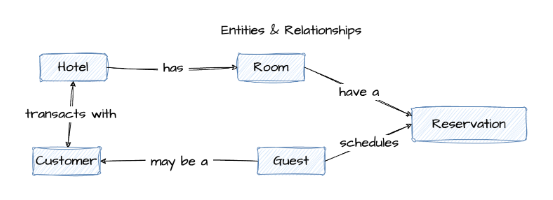
With this structure in place, your system can track room availability in real-time, identify booking patterns, and generate insights about occupancy rates and guest preferences.
E-commerce platform
For online retail, this concept modeling example tracks the customer journey from browsing to delivery. It clarifies how shopping behavior connects to your fulfillment processes.
Here are some example key entities in a typical conceptual map for e-commerce:
|
Entity |
Definition |
Relationship |
|
Customer |
The person shopping |
Creates shopping carts and places orders |
|
Shopping Cart |
Temporary collection of desired items |
Belongs to one customer, contains many products |
|
Order |
Finalized purchase |
Placed by one customer, contains products, has one payment |
|
Product |
Items for sale |
Can be in many carts and orders |
|
Payment |
Transaction details |
Linked to one order, processed for one customer |
|
Shipment |
Delivery information |
Fulfills one order, delivers products to customer |
A customer fills a shopping cart, places an order containing products, completes a payment, and receives a shipment. This structure lets you track conversion rates at each stage, identify where customers drop off, and optimize your fulfillment process based on real behavioral data.
Subscription service platform
This model focuses on recurring customer relationships and service delivery. It connects subscriber identity with usage patterns and billing cycles.
Typical core entities include:
|
Entity |
Definition |
Relationship |
|
Account |
The business relationship |
Contains many subscribers, has multiple plans and invoices |
|
Subscriber |
Individual users |
Belongs to one account, assigned to one plan, generates interactions |
|
Plan |
Service tiers and features |
Can be assigned to many subscribers, linked to invoices |
|
Invoice |
Billing records |
Generated for one account, reflects plan pricing |
|
Interaction |
Support tickets, feature usage, feedback |
Created by subscribers, tracked against accounts |
An account contains subscribers who are assigned plans, receive invoices, and generate interactions with your service. This structure connects subscription activity with usage behavior, helping you spot churn signals, refine pricing strategy, and understand which features drive retention.
How to create a conceptual data model
Building a conceptual model is more about asking the right questions than mastering technical tools, but it does demand a thorough understanding of your business use case. Here’s a simplified process for developing the foundations of your conceptual model.
1. Capture business requirements and key entities
Start conversations with your business stakeholders to identify what matters most to them. Focus on the main objects, events, and people that drive their daily operations, not the technology that might support them.
2. Define relationships and cardinality
Map out how your entities connect to each other. Ask specific questions like "Can one customer place multiple orders?" or "Does every product belong to exactly one category?" These answers define your business rules.
3. Validate with stakeholders
Take your draft model back to business users for feedback. Walk through scenarios using simple diagrams to confirm the model accurately reflects how they see their operations working.
4. Document in a visual format
Create a clear diagram using tools like whiteboards or specialized data modeling tools. This visual becomes your official blueprint for both business and technical teams, who will use it to design the logical and physical layers of the model.
A logical data model (LDM) is a structured representation of data that outlines entities, attributes, and relationships without referencing any specific database or technology.
It builds on the conceptual model by introducing more detail, like primary keys and data types. Think of it as the blueprint before you start coding.
A logical data model is:
Platform-independent: Still not tied to any specific database
More detailed: Includes fields, keys, and data types (at a high level)
Normalized: Reduces redundancy for better data integrity
Example: Logical model for a hotel reservation system
Below is a sample ER diagram showing how a logical data model might look for a hotel booking use case:

Logical models add structure without locking you into technology decisions. Here's why they’re a critical step before moving to implementation:
Stronger data integrity: With defined keys and normalized relationships, your model helps eliminate duplication and inconsistencies, so your data stays clean from day one.
Clearer structure for developers: Logical models introduce enough technical detail (like attributes and keys) to guide implementation, without diving into platform-specific syntax.
Smarter database design downstream: By working through normalization and relationships early, you reduce rework and performance issues later in the physical model.
Better alignment with business rules: You’re not just designing for storage, you’re mapping how your business actually works. That alignment helps keep systems flexible and intuitive.
Reusable foundation for multiple systems: Since it’s platform-independent, a logical model can feed into multiple databases or applications, supporting consistency across your data landscape and allowing self-service analytics that relies on well-structured, trustworthy data.
In the conceptual data model, the entities and relationships were all defined. The next step is to use data modeling best practices to turn that high-level concept into a detailed, normalized logical data model.
Here’s what that process typically involves:
Step 1: Validate your CDM
Make sure the entities and relationships in your conceptual model are correct and complete.
Step 2: Add attributes
Identify additional attributes needed for each entity.
Step 3: Identify candidate keys
Look at the attributes that uniquely identify each entity.
Step 4: Choose primary keys
Work with stakeholders to pick the best candidate as the primary key, ideally, a single field.
Step 5: Normalize the model
Use 3rd Normal Form (3NF) to eliminate redundancy. Or, if you're designing for analytics, consider dimensional modeling for performance.
Pro tip: If something doesn’t fit 3NF, try splitting it into a new entity.
Step 6: Adjust your ER diagram
As you normalize, you might need to create new entities, attributes, or relationships.
Step 7: Define relationships
Validate the relationships between entities with your stakeholders.
Pro tip: Too many relationships to a single entity? You might have a design flaw.
Step 8: Set cardinality
Decide how many instances of one entity relate to another (e.g., one-to-many, many-to-many).
Step 9: Validate the logical model
Cross-check it against business requirements to ensure it fits the real-world use case.
Step 10: Iterate and refine
Data modeling is rarely one-and-done. Update the model as requirements evolve.
A physical data model (PDM) is a technical blueprint that maps your logical data model to a specific database system, including cloud data warehouses like Snowflake or BigQuery. It outlines exactly how data will be stored, indexed, and accessed, down to the datatype, column length, and constraints.
It’s where design meets reality.
A physical data model is:
Database-specific: Tailored to a specific platform like Snowflake, BigQuery, or Postgres
Fully detailed: Includes concrete data types, indexes, constraints, and storage formats
Performance-driven: Designed to optimize query speed, storage efficiency, and scalability
Example: Physical data model for a hotel reservation system
Below is a physical data model derived from a hotel booking system. It includes concrete field types, primary and foreign keys, and relational constraints.

What’s different from the logical model:
Primary (PK) and foreign keys (FK) are explicitly defined
Field types like varchar(64) and int are specified based on database requirements
Indexes and constraints (e.g., UK for unique keys) are visible
Table relationships are enforced through actual referential integrity
Physical models take your design all the way to execution. Here’s why they’re essential for building performant, scalable systems:
Database-ready from day one: Unlike abstract models, a physical data model is ready to be implemented in your chosen database. It defines tables, data types, indexes, and storage rules, so your schema is production-ready.
Faster queries, better performance: With indexing, partitioning, and the right level of normalization baked in, physical models help your system handle complex queries and large volumes of data without slowing down.
Scales with your business: A well-modeled physical layer supports growth, whether that means more users, more data, or more applications. You’ve already done the work to support scaling without a major re-architecture.
Fewer data quality issues: Physical models include constraints that protect your data, like primary keys, foreign keys, and field-level rules. That means fewer bad inputs, fewer errors, and more reliable insights, all of which contribute to stronger data quality over time.
💡 Pro tip: Looking for the right data modeling tools? Make sure they support all three layers, conceptual, logical, and physical, and work well with your modern data stack.
Clear blueprint for implementation: From schema creation to storage allocation, a physical model guides DBAs and engineers through the technical build. Everyone’s aligned, and there’s less guesswork during development.
Moving from a logical data model (LDM) to a physical data model (PDM) is rarely a one-and-done task. It’s an iterative process that involves refining the structure and incorporating platform-specific details to support how the data will actually live and behave in your database.
A strong physical design starts with a solid logical model, but also demands an in-depth understanding of your cloud data platform and use case.
Here’s how that transition typically unfolds:
Step 1: Select the data platform
Decide where the data model will reside. The chosen platform will impact decisions in subsequent steps and let you take advantage of platform-specific capabilities.
Step 2: Convert logical entities into physical tables
Each entity from the logical model is mapped to one or more physical tables. Use candidate keys from the logical model to define the primary key of each table.
Step 3: Define the columns
Translate each attribute into a column and specify the appropriate data type (e.g., integer, varchar, date).
Step 4: Define relationships
Establish foreign key relationships between parent and child tables by creating a foreign key in the child table that references the parent table's primary key.
Step 5: Verify normalization (3NF)
Ensure the tables meet third normal form (3NF) to minimize redundancy and maintain data integrity. This may involve splitting or combining tables based on normalization principles and platform capabilities.
Step 6: Define indexes and partitions
Create indexes and partitions based on commonly queried fields to improve performance. Start simple (KISS: keep it simple, smarty) and optimize iteratively based on platform behavior and workload.
Step 7: Implement table constraints
Add constraints like primary keys, unique keys, null/not-null checks, and others. Even if the data platform doesn’t enforce all constraints, defining them can benefit downstream tools and applications.
Pro tip: Most cloud data platforms don’t enforce every constraint, but defining them still matters. Analytics tools and downstream apps use them to maintain data integrity and improve performance.
Step 8: Add programmability elements
Depending on your use case, implement stored procedures, views, triggers, streams, and tasks to support automation, SQL analytics, and automated data pipelines.
These elements bring your physical model to life by powering real-time operations, scheduled transformations, and custom business logic.
Step 9: Validate with stakeholders
Make sure the physical model supports the business requirements outlined in the logical model. Use test data and example queries to confirm accuracy and performance.
A well-structured logical model makes physical modeling easier, but the two aren’t a clean handoff, they’re connected, iterative stages. The goal of physical modeling is to take business intent and turn it into a working, performant, and trustworthy database design, one that reflects both how your organization thinks and how your technology behaves.
💡 Want to explore how physical data models differ in structure and performance? Check out Star Schema vs Snowflake Schema to choose the right model for your analytics layer.
Turn your conceptual models into competitive advantage
Your conceptual model provides the foundation for logical and physical data models. Once implemented in your database, that physical layer becomes the source of truth for analytics across your organization.
Modern analytics platforms connect directly to your physical data models, interpreting the structure you've carefully designed. When your underlying models are well-built, analytics tools can deliver accurate, consistent answers to business questions, even for users without advanced technical skills.
The result: Executives can explore KPIs through interactive dashboards, analysts can dig into trends without switching tools, and AI agents deliver instant answers to your team’s questions—all powered by the solid data foundation you established at the conceptual stage.
Strong data modeling translates into powerful analytics, and the proof is in the performance. Start your free trial today and experience how ThoughtSpot turns your carefully planned data structure into insights that drive real business outcomes.
Conceptual vs logical vs physical data models FAQs
1. How detailed should a conceptual data model be before moving to logical design?
Your conceptual model should identify all key business entities and their relationships, with stakeholder agreement that it accurately represents operations. Move to logical design once business rules are clear and validated.
2. What tools work best for creating conceptual models and ERDs?
You can use anything from whiteboards for initial brainstorming to specialized software like Lucidchart, Miro, or dedicated data modeling tools. The key is clear communication, not any specific tool.
3. Can you skip the conceptual model and start with logical data modeling?
While it's possible, skipping the conceptual model means you risk building systems that don't reflect actual business needs. Starting conceptually helps you capture business context before defining technical details.
4. How often should you update conceptual models as business requirements change?
Review your conceptual models whenever significant business changes occur, such as new product launches or market expansion. Keeping your models current helps your data architecture continue to support your business goals.
5. What is data modeling?
Data modeling is the process of creating a visual or conceptual representation of data and how it flows within a system. It helps define the structure, relationships, and rules that govern your data.
Think of it as the blueprint for your data, it outlines how different data elements relate to each other so teams can use and analyze information consistently.
6. What are the 5 types of conceptual models?
While “conceptual data model” usually refers to a specific type of data modeling, the term “conceptual model” is broader and spans multiple domains. In data and system design, here are five common types:
Entity-Relationship Model (ER Model): Represents data using entities (things) and relationships between them. Common in database design.
Object Role Modeling (ORM): Focuses on the roles objects play in relationships and is often used in systems analysis.
Semantic Data Model: Emphasizes meaning and context, often using ontologies and taxonomies to define relationships and constraints.
Hierarchical Model: Organizes data in a tree-like structure, where each record has a single parent and potentially many children.
Network Model: Similar to the hierarchical model but allows more complex relationships between entities (many-to-many instead of just parent-child).
7. Why do I need different types of data models? Can’t I just jump straight to the physical model?
Skipping conceptual and logical models can lead to confusion, misaligned teams, and costly redesigns. Conceptual and logical models help everyone from business stakeholders to engineers agree on what data matters and how it should be structured before diving into technical implementation.
8. What happens if my business requirements change after I build the data models?
Data modeling is an iterative process. You’ll need to revisit and adjust your models as your business evolves. That’s why starting with conceptual and logical models helps they are easier and cheaper to update before the physical model gets locked in.
9. Can a logical model be used with multiple physical databases?
Yes. Because logical models are platform-independent, you can use the same logical design as a blueprint to create multiple physical models for different database systems, which helps maintain consistency across your data environment.
10. What are some common mistakes to avoid when modeling data?
Some pitfalls include starting with physical design too early, ignoring business input, overcomplicating models with unnecessary entities or relationships, and not validating models with stakeholders regularly. Also, skipping normalization can lead to messy, redundant data.


