- Mobile BI gives you focused access to business data, dashboards, alerts, and follow-up analysis from a phone or tablet.
- The best mobile sessions answer three questions: What changed, why did it change, and what should happen next?
- Useful mobile BI features include contextual alerts, drill-down, natural-language questions, sharing, personalization, and governed access.
- Mobile dashboard design should prioritize one decision, readable context, clear hierarchy, and touch-friendly interactions.
- A strong rollout starts with recurring decision moments, then maps the required data, permissions, devices, and review process.
A critical number changes while you are away from your desk. You can see the movement, but can you understand it well enough to act? Mobile BI should close that gap without forcing you through a desktop dashboard on a small screen.
Mobile business intelligence gives you access to business data, dashboards, alerts, and follow-up analysis on a phone or tablet. Its value comes from short, decision-led sessions that help you know what changed, understand why, and choose the next step.
What Mobile BI Is and How It Differs from Desktop BI
Mobile BI brings selected business intelligence tasks to mobile devices. Depending on the product, those tasks can include checking KPIs, receiving alerts, viewing visualizations, drilling into data, asking questions, and sharing findings.
The important distinction is the working moment. Desktop BI suits longer analysis sessions with more room for comparison, exploration, and detailed building. Mobile BI suits focused sessions when you need a trusted answer before the next meeting, call, or operational choice.
That makes mobile BI part of a broader enterprise BI platform, rather than a separate data environment. The same governed definitions and access rules should follow the user across both experiences.
| Consideration | Mobile BI | Desktop BI |
|---|---|---|
| Typical session | Short and focused | Longer and exploratory |
| Primary task | Check, investigate, decide, share | Analyze, compare, build, model |
| Layout | Prioritized for a smaller screen | Designed for more screen space |
| Best next step | Act or hand off with context | Continue deeper analysis |
Neither experience needs to replace the other. A mobile session may begin with an alert and end with a decision. Another may reveal a question that deserves deeper desktop analysis.
For business leaders, that handoff matters. You should know whether a mobile view offers enough evidence for action, or whether the right next step is a closer review with your team.
Where Mobile BI Earns Its Place
A long list of mobile features can distract from the real question: Which decisions become easier when trusted data travels with you? Start with the business moment, then choose the experience that supports it.
Mobile BI can be useful when you need to:
Check a priority KPI before a leadership meeting.
Review an operational change while moving between locations.
Receive an alert when a tracked measure changes.
Ask a follow-up question without waiting for a new report.
Share a finding with a colleague while the context is fresh.
These moments have a common shape. You need a focused signal, enough context to interpret it, and a clear path to the next action. A miniature copy of a desktop dashboard rarely provides that clarity.
Decision Moments Worth Supporting
Consider a revenue measure that changes before a forecast discussion. The useful mobile experience highlights the change, shows relevant context, and lets you investigate the drivers. You can then enter the meeting with a sharper question or a clear next step.
An operations leader may need a different flow. An alert between locations could lead to a KPI review, a drill-down, and a shared finding for the local team. The device is secondary; the decision path is what gives the session value.
Mobile BI is less suitable when the task calls for extensive comparison, dashboard creation, or detailed modeling. In those cases, the mobile experience can frame the issue and carry context into a deeper desktop session.
Features That Make Mobile BI Useful
Useful mobile BI software should reduce the work between signal and decision. That starts with alerts, but an alert alone is only a notification. It needs enough context to help you judge whether the change deserves attention.
Automated insights can support that flow by helping users examine metric movement. The surrounding mobile experience should make the affected measure, relevant period, and available follow-up clear.
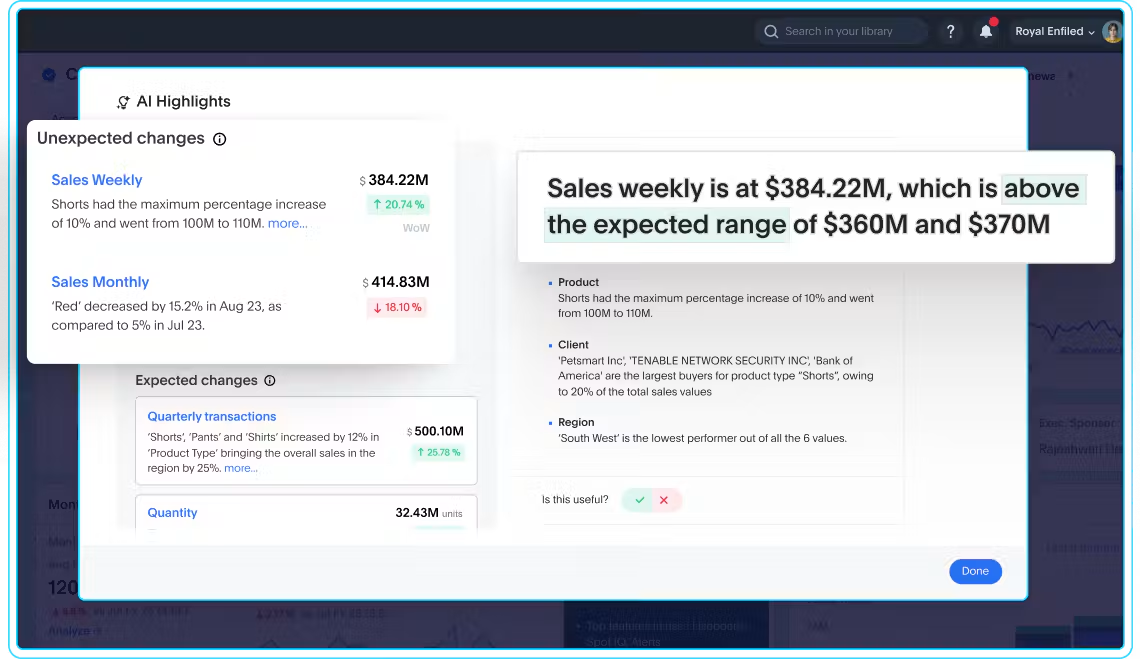
Drill-down is the next requirement. Once you see a change, you should be able to explore it without following a rigid, predefined path. A useful flow moves from summary to detail while keeping the original business question visible.
Personalization also matters. A business leader needs a focused view of the KPIs tied to current decisions, rather than every available measure. Watchlists, saved views, or similar product features can keep those priorities close.
Finally, sharing should preserve context. Sending a screenshot may capture a number, but it can lose the filters, time period, and path behind it. The stronger experience lets you share the finding from the analysis session.
Natural-Language Follow-Up and Collaboration
Small screens make complex menus harder to use. Natural-language analytics offers a more direct route: ask what changed, which segment contributed, or where the movement occurred.
BI agents can support this conversational approach to analysis. For business leaders, the practical test is simple. Can you ask a clear business question and receive an answer grounded in governed data?
Follow-up questions should stay connected to the original context. If an alert shows a KPI movement, your next question should build from that point instead of starting a separate search.
Collaboration completes the path. Once you have enough context, you should be able to share the finding with the people who can respond. That keeps the conversation tied to the data behind the decision.
Mobile Dashboard Design for Clear Decisions
Mobile dashboard design should begin with the decision a view supports. When every chart and filter competes for limited space, the most important signal becomes harder to find.
Start with a clear hierarchy. Put the priority KPI or change first, then add the context needed to interpret it. Labels should remain readable, and each interaction should have an obvious purpose.
Touch targets deserve deliberate attention. The W3C explains that WCAG target size applies to web content on mobile devices. Its Level AAA criterion uses at least 44 by 44 CSS pixels as a benchmark, with stated exceptions.
That benchmark is useful for accessibility planning, not a blanket legal requirement. It offers a concrete way to review filters, buttons, and drill controls that users need to select by touch.
Interactive Liveboards can give users real-time views with paths into more detail. On mobile, the view should still stay focused on the question at hand.
A Practical Mobile Design Checklist
Before approving a mobile dashboard, ask five questions:
Decision: What choice or response should this view support?
Priority: Which KPI or change needs attention first?
Context: Which period, comparison, or filter explains the number?
Interaction: Can users select, drill, and navigate comfortably by touch?
Next step: Can users investigate further or share the finding with context?
If the answer to any question is unclear, the view may be carrying too much. Remove elements that do not support the decision, then test the full path again.
Security, Governance, and Rollout Criteria
Mobile access brings business data into a wider device environment. Security and governance should therefore shape the mobile BI plan from the start, alongside features and design.
NIST states in its mobile device guidance that smartphones and tablets are permanent enterprise fixtures. They access networks and systems, and they can process sensitive data.
The same guidance covers centralized device management, endpoint protection, and lifecycle practices. Those areas give IT and business teams a practical starting point for mobile analytics planning.
Your evaluation should also cover access permissions and trusted metric definitions. A mobile answer should reflect the user’s approved access and the same business meaning used elsewhere in the analytics environment.
Governance becomes visible during the full session. Review what appears in alerts, what data can be opened, how findings are shared, and what happens when a device or user status changes.
How to Evaluate and Roll Out Mobile BI
A staged rollout keeps the evaluation tied to real work. Begin with a few recurring decision moments where faster access could make a practical difference.
Define the decision. Name the question, responsible role, and expected next step.
Map the data. Identify the KPIs, context, and governed definitions the user needs.
Review access. Confirm permissions, device practices, and sharing boundaries.
Test the path. Follow the experience from alert or question through investigation and action.
Review usage. Ask whether people can reach a trusted next step with confidence.
Offline access deserves a separate review because support varies by product and configuration. Evaluate data freshness, stored-data exposure, and update behavior against the situations your teams actually face.
Avoid starting with a broad feature checklist. A product can look complete on paper while adding friction to the specific decisions your leaders need to make.
Trusted Mobile Answers with ThoughtSpot
ThoughtSpot is the Agentic Analytics Platform. Its mobile experience is built around trusted, personalized answers that help users work with business data while away from a desktop.
With ThoughtSpot Mobile, users can search business data in natural language and interact with visualizations and Liveboards. They can also receive trusted personalized answers from a mobile device.
A personalized Watchlist helps users follow selected KPIs. Automatic or custom alerts can arrive by push notification or email, while AI Insights can help explain drivers behind KPI changes.
When a question needs more detail, users can drill into Liveboards and share findings on the go. That supports a useful mobile BI flow: notice the change, investigate the reason, and bring the finding into the next conversation.
These capabilities should be assessed within your own governance, device, and workflow requirements. The goal is a mobile experience that keeps business context attached to every answer.
Put Mobile BI Closer to the Decision
Mobile BI earns its place when it shortens the path from a changed metric to a trusted next step. That path depends on focused use cases, useful follow-up, clear design, and governed access.
Start with one recurring decision that currently stalls when someone leaves a desk. Define the signal, context, and action it needs. Then judge each product feature by how well it supports that path.