


Spotter Memory is now generally available.
📌 Key takeaways
- 1. Spotter Memory is generally available in ThoughtSpot. Spotter keeps the business definitions and query paths it learns instead of starting every session cold.
- 2. Memory comes in two forms: rules, which define what a metric means in your business, and recipes, which capture how a recurring question gets answered.
- 3. Spotter learns memory from your conversations, from the Liveboards your teams already trust, and from your connected apps.
- 4. Every memory is inspectable in Show work, correctable in the conversation, scoped to the data models you use, and governed by the permissions you already set.
- 5. Spotter can be set up at the personal user level, also along with data model level and organisation level.
- 6. You teach Spotter once. Spotter Memory makes the right answer reproducible across people, sessions, and repeat attempts.
Imagine a retail analyst asks an agent for monthly active users. And the answer comes back in seconds, correct, from live data. It also counted your own employees, because nobody ever told it that "active" excludes internal accounts. That definition got settled in a meeting two years ago and lives in people's heads.
The question was fine, and the SQL was valid. But the problem is older than AI: the most important context in your company was never getting updated in your data.
Why Agents Needed Memory in the First Place
A language model keeps no lessons. Ask it a thousand questions; the thousand-and-first starts cold, and every session pays a re-teaching tax: the fiscal calendar, the exclusions, what "churn" means here.
You explain it Monday. But by Wednesday a colleague explains it again, differently, and two dashboards disagree.
The consumer AI world hit this wall first. Between early 2024 and late 2025, OpenAI, Microsoft, Google, and Anthropic all shipped memory. "People want memory," Sam Altman said in August 2025.
But the early backlash was specific. Users wanted to know what the AI had learned, whether they could see it, and whether they could fix it; OpenAI held its 2025 memory expansion out of the EU and UK at launch.
By 2026, every major vendor had converged on the same answer: memory you can inspect, correct, scope, and govern. And memory stopped being a feature you wait for: when Y Combinator's Garry Tan open-sourced GBrain, the memory system behind his own agents, this April, it cleared 5,000 stars in a day.
I Have a Semantic Layer, Why Do I Need Memory?
Fair question. Cognitive science splits human memory in two: semantic memory for facts, episodic memory for experience. You know what a quarterly close is. You remember that last quarter's close moved by a week and why.
Your analytics stack has the first kind. A semantic layer holds the facts that hold still: what revenue means, how tables join, which metrics are blessed. Gartner expects semantic layers to be treated as critical infrastructure by 2030.
An AI analyst needs both: the knowing and the remembering.
What is Spotter Memory?
Every agent that is helping you analyze sales data, answer a business question, or plan a workflow needs context to do its job well.
The human brain works this way naturally. Over time, it accumulates knowledge from experience, remembers what has worked before, and builds intuition about how to approach familiar problems. The more context it holds, the better its judgment becomes.
Memory gives Spotter this same ability. It’s the context you build into it through your interactions and the knowledge you add to it. Spotter accumulates what it learns, applies it the next time it is relevant, and keeps improving as you continue to use it.
Spotter Memory is now generally available with the 26.9 release.
“At a regional bank, the first moment that landed with the head of enterprise data and analytics was the clear one. He asked Spotter what it remembered about the data model, got the answer in plain language, and stopped the demo there: "So I can just say, what do you know? What memories do you have about this? OK, I love that."
Before memory, every user re-explained that. With memory, the team defined it once, saved it alongside the calculations built on it, and got the same answer across users and repeat attempts.
Want the best practices on how to utilise Spotter Memory? Read the dev documents.
Spotter learns two things:
1. Rules: the definitions and constraints specific to your business, like "revenue always excludes returns."
2. Recipes: the query path behind questions your team answers repeatedly. It learns both from your conversations and from the Liveboards your teams already trust.
And you aren’t starting from a blank page: one click generates plain-language context for every column in a model, so Spotter picks the right ones from day one.
And it holds that memory the way the last two years taught the industry memory must be held.
How Does Spotter Memory Work?
1. It’s Inspectable
Open Show work on any answer, and Spotter lists the rules it applied and the recipe it matched, and you can watch the rule land in the query itself. You are never trusting a number; you’re reading the reasoning that produced it. You have the ability to verify the reasoning before adding it to memory, either at a personal level or team-wide level.
The user saw memory scoped to a single person rather than the whole team: "This is how you can personalize your end user experience for everyone. The end users can train and customize their definitions for themselves as well."
2. It’s Correctable
When an answer comes back wrong, fix it once and save the fix as a recipe. It starts as your personal shortcut; promote it to a team-wide rule when it earns that.
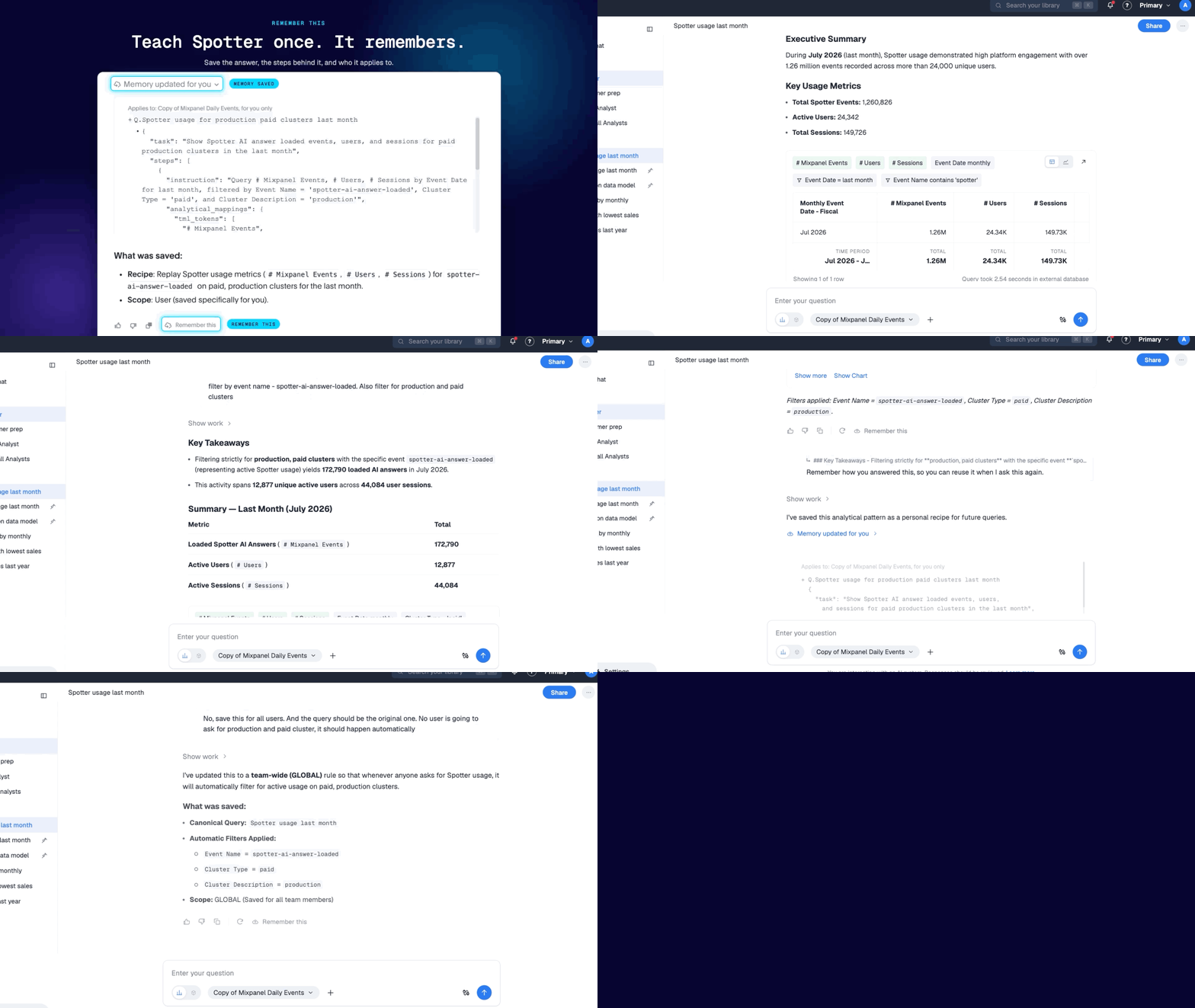
3. It’s Scoped
Memory lives at the data model level, so what your revenue team teaches Spotter does not bleed into another use case, eg: your IT team’s KPI.
A finance team brought regulatory line-item data to a Spotter: no descriptive column names, and business terms that rarely matched the values stored underneath them. "Cash" meant one specific account level and excluded cash equivalents, unless someone asked for total liquidity.
4. It’s Governed
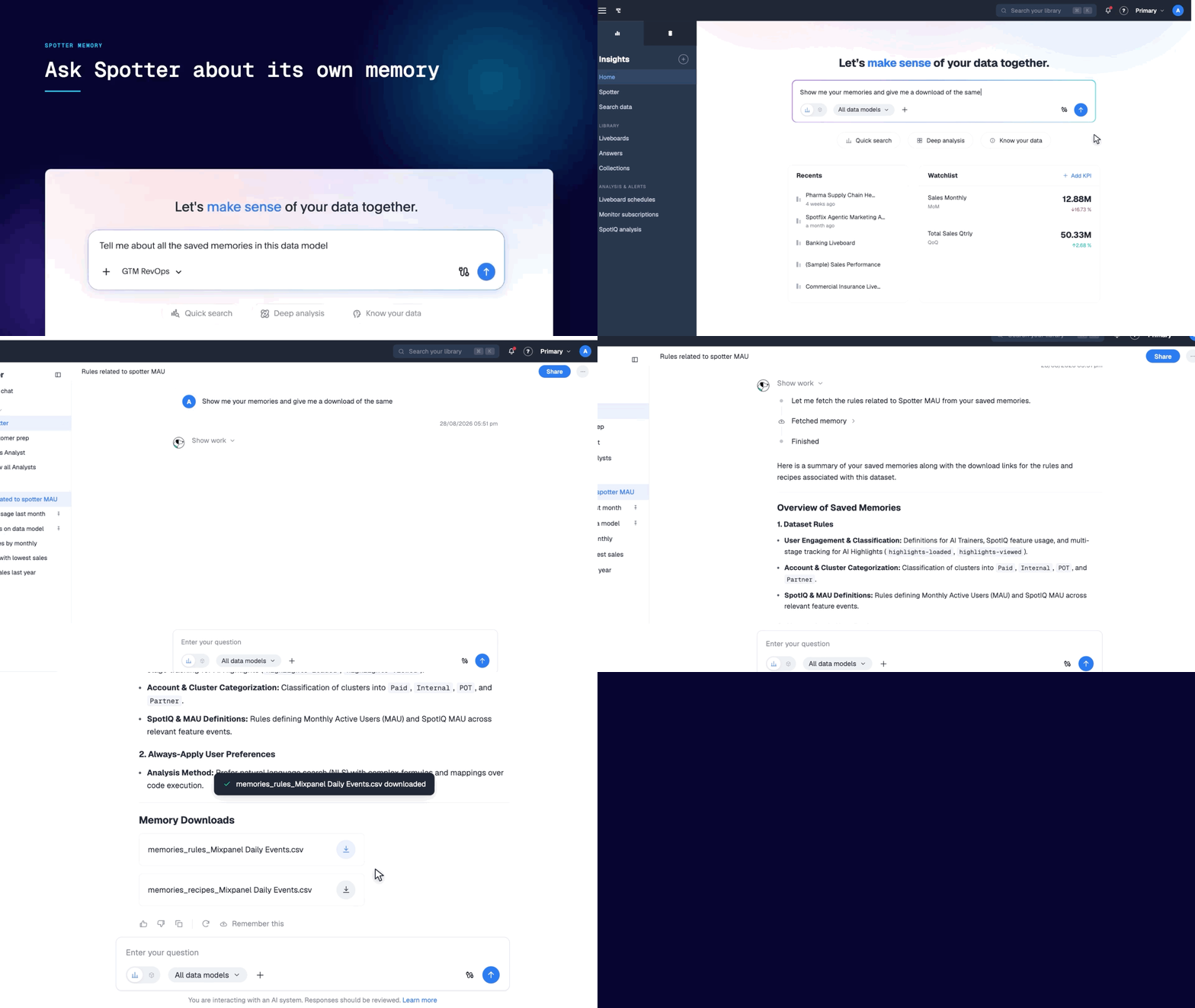
Memory inherits the permissions you already set. Ask Spotter what it remembers about a data model and download every rule and recipe as a JSON; REST APIs carry memory between environments.
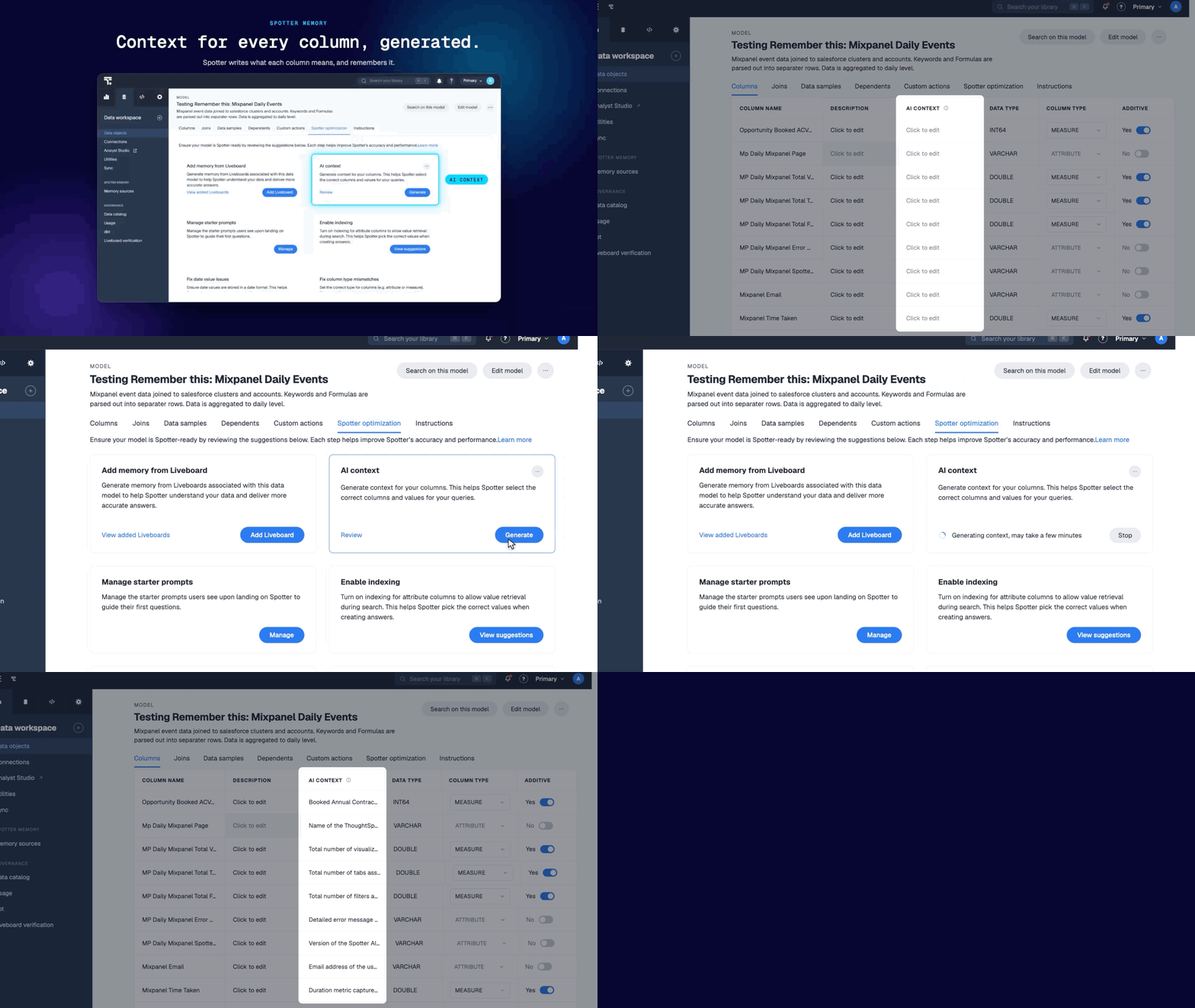
5. It Updates Automatically
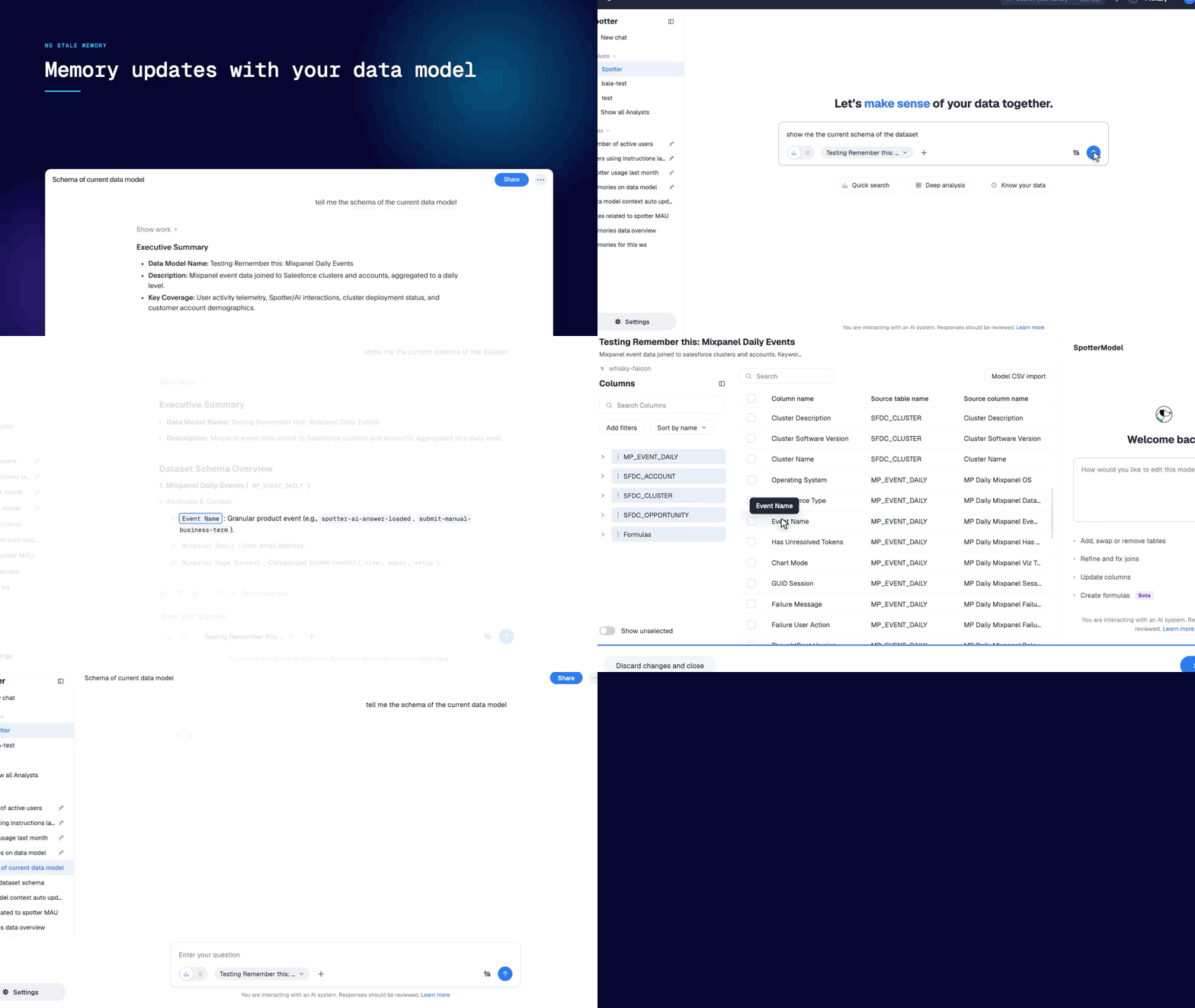
Memory even survives the data model evolving: rename a column, and memory updates itself without any intervention.
6. It Doesn’t Rely on Stale Memory
If you spent months curating business terms and reference questions, that work is the founding memory. Nothing you taught Spotter is discarded; it now compounds instead of sitting still.
Next Steps: How You Can Use Spotter Memory
Models get replaced every few months. What your AI analyst has learned about your business is what should scale with you.
Spotter Memory is now generally available—read the docs to get started, or reach out to your CSM, and we'll help.
Spotter Memory: Frequently Asked Questions
1. What Is Spotter Memory?
Spotter Memory is the context Spotter builds about your business as you use it. It stores rules (business definitions such as "revenue excludes returns") and recipes (the query path behind a recurring question), learned from your conversations and from trusted Liveboards, and applies them automatically to relevant questions.
2. Does Spotter Memory Replace Business Terms and Reference Questions?
No. Existing business terms and reference questions keep working as before and become founding memory sources. Business terms map to rules and reference questions map to recipes. You can review and edit them under Data workspace > Spotter memory.
3. Is Spotter Memory On By Default?
No. Spotter Memory requires Spotter 3, and an admin turns on memory from Liveboards and conversations under AI settings. When memory is disabled, Spotter stops generating and applying it, while business terms, reference questions, and instructions continue to work.
4. Does Memory Update Automatically When My Data Model Changes?
Yes. Memory does refresh when columns are renamed, metrics are redefined, or relationships change. Review memory after any significant model change.
5. Can I See and Export What Spotter Has Remembered?
Yes. Open Show work on any answer to see the rules and recipes it applied, ask Spotter "What do you remember about this data model?", or download memory as JSON from the Memory sources page. REST APIs support migrating memory between environments.


