


📌 Key takeaways
- 1. Spotter usage limits give your AI feature the controls every other feature already has: who gets it, how much, and when, set per org, user group, or user.
- 2. Your customers see a live counter, a heads-up near the limit, and a block at the limit, in your brand and your words.
- 3. The upgrade click goes to your app. ThoughtSpot never touches billing.
- 4. One REST call changes a limit and one SDK event refreshes the counter, with no reload and no support ticket.
- 5. Pools run from your backend through Beta REST APIs, with no admin screen and no automatic resets, so plan for a small service.
Every feature you ship answers three questions: who gets it, how much of it, and when. That's how a product team shapes the experience. A new customer gets room to explore so they reach value fast, usage settles into a plan as the account matures, and the top tier earns its price. AI features usually skip all three. They ship on or off for everyone, at whatever volume your customers choose, and you learn the cost after the fact.
Spotter usage limits, new for ThoughtSpot Embedded in ThoughtSpot Cloud 26.11, give Spotter the same controls as the rest of your product. Be generous while a new customer learns what to ask, then pace the allowance as they settle into a plan, with your own upgrade path ready when they want more. ThoughtSpot counts the questions and enforces the limit. You design the experience and set the price.
Why Does Embedded AI Need Usage Controls?
Because without them you can't shape the experience or the economics, and those are the two things a product team owns.
You stage every other capability. Onboarding is generous so a new account reaches a useful answer quickly, and allowances tighten or widen as accounts mature. Without controls, an AI analyst has two settings for every account at every stage: off, or unlimited.
The economics break the same way. Your plans are priced by seat or by tier, and Spotter's work happens one question at a time. A seat price can't tell a curious user from a relentless one, so an AI feature shipped without a meter is an open tab: unlimited questions, on your dime, for every customer at once. Additionally, the embedded analytics vendor that doesn't introduce a way to manage this basically punishes the embedded customer for being successful; i.e., your most engaged end users end up costing you on your AI "run bill".
Your most engaged users shouldn't become your biggest AI expense. Learn how to control token usage and keep your AI bill predictable.
So product teams hold back. Building that control yourself (usage per tenant, a counter, a block, and a sync with billing) is a project, and it competes with everything else on your roadmap.
For your head of product, the visible win is a new AI line on the pricing page. The win your CFO notices is quieter. The margin on that line becomes a number you set, instead of one you discover at quarter-end.
What Do Spotter Usage Limits Actually Do?
A usage limit is an allowance of Spotter questions, which ThoughtSpot calls a pool. Each pool holds a limit, a warning threshold, and a running count, and it attaches to one kind of thing:
An org, so every user in a tenant draws from one shared allowance, which fits apps where each customer is an org.
A user group, so everyone in the group, such as one customer's team, draws from one shared allowance.
A user, so each person gets an allowance of their own, the way a seat would.
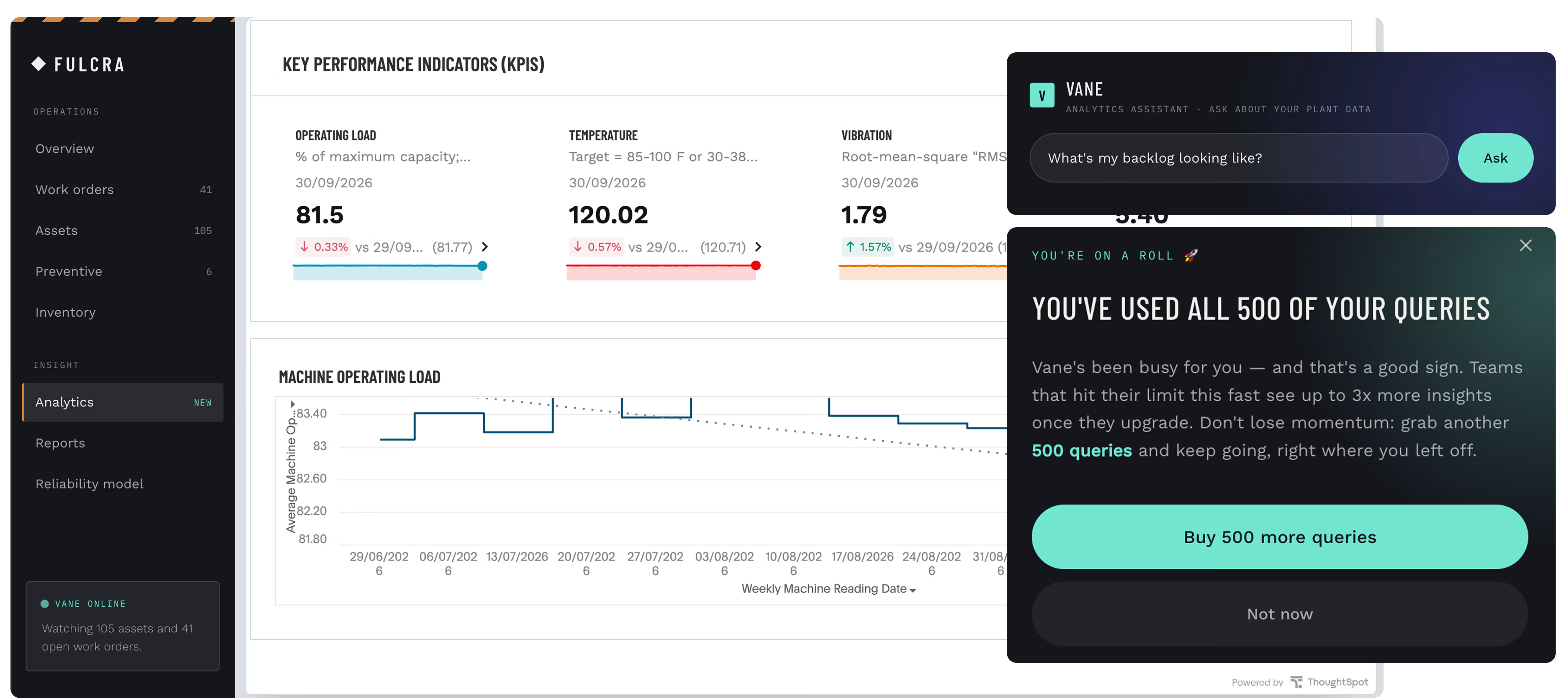
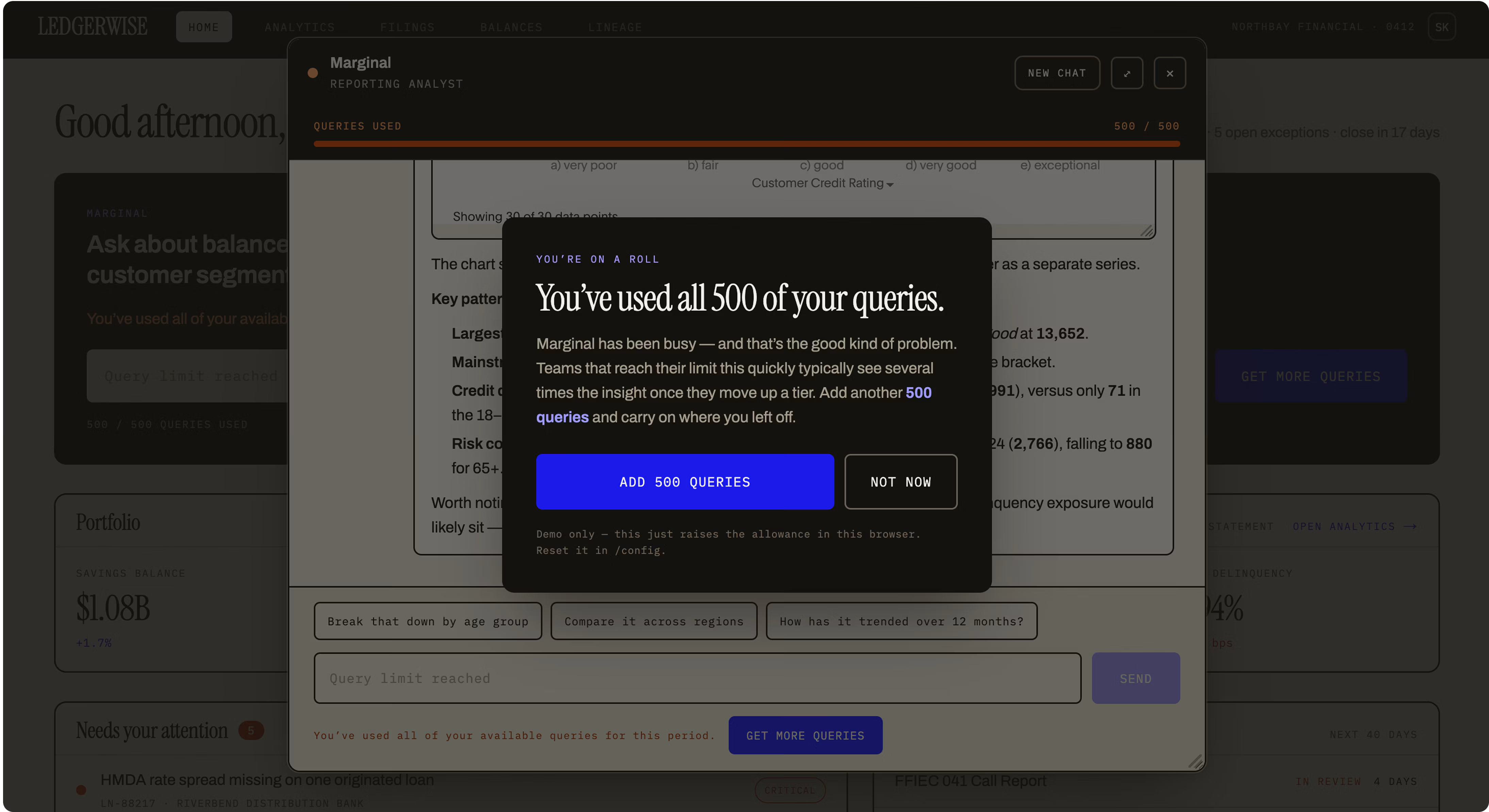
Spotter counts every question against the pool, shows people where they stand, warns them at the threshold, and stops new questions at the limit. Allowances add up when a user sits in more than one pool, and anyone outside every pool isn't metered at all, so you can roll limits out one customer at a time.
How Should You Package Spotter Into Plans?
Run Spotter through the same three questions as any other feature, before your developers write anything. The answers are your pricing design, and they're cheaper to change on a whiteboard than in production.
1. Who gets it? Pick the unit that shares an allowance: org, user group, or user. A cluster meters at one scope at a time, and switching later means deleting every pool, so decide this first.
2. How much? Set the limit to what the plan includes, and the warning early enough that the upgrade prompt reads as a heads-up rather than a penalty.
3. When? An allowance doesn't have to stay fixed. Your backend can change a pool's limit, or move a user to another group, at any point in the account's life. Decide, too, when the counter shows and where the upgrade button sends people.
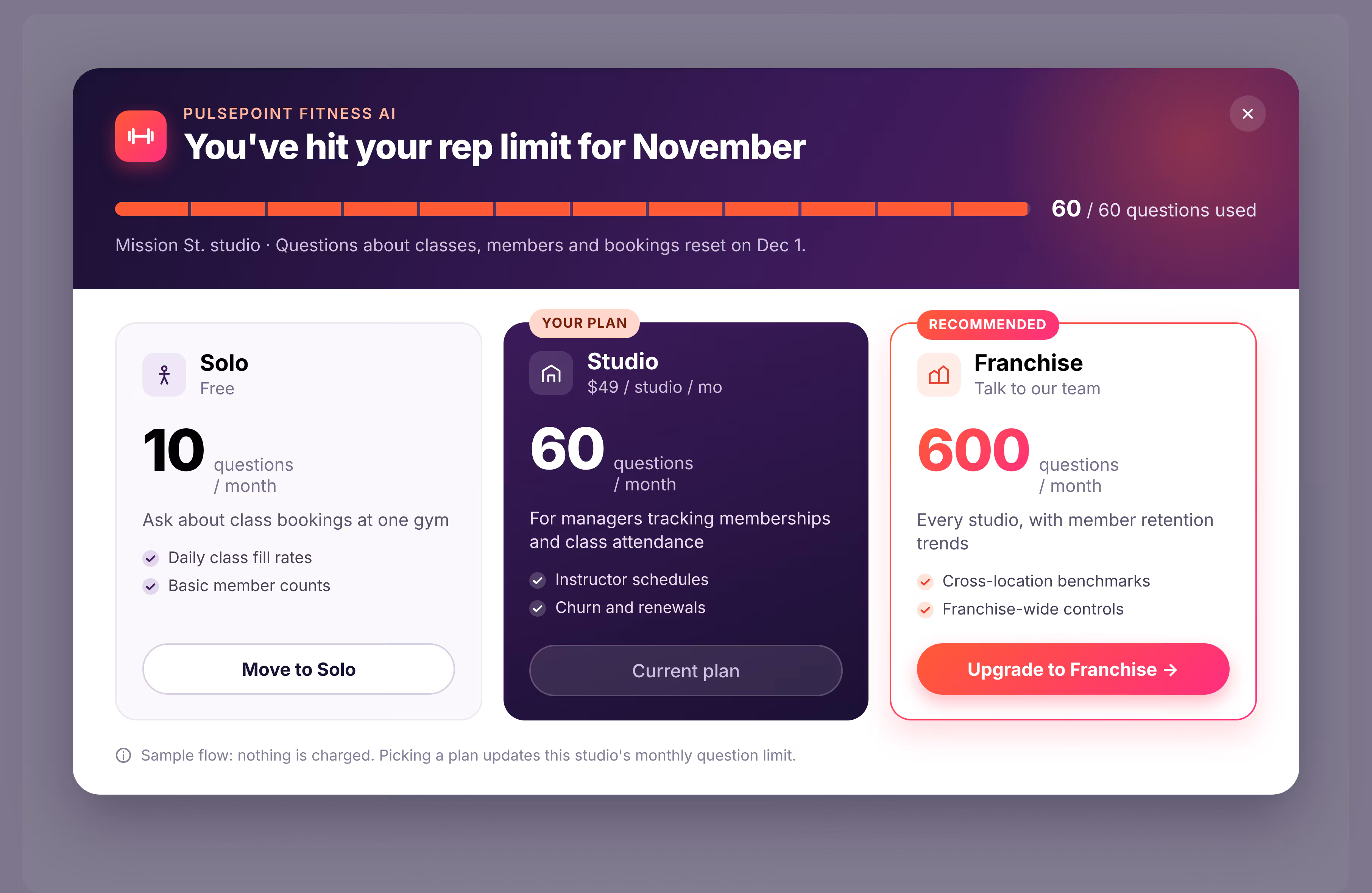
The packages product teams ask us about most fall out of those answers:
Generous early, paced later: start a new customer's pool with a large allowance while they learn what to ask, then set it to their plan's allowance once they're live.
A trial that converts: a small allowance, and an upgrade button that opens your checkout.
Good, better, best: one allowance size per tier, applied to each customer's pool when they buy.
Seat-based: user scope, with each person's pool sized by their plan.
Org and group pools are shared by everyone in them, and that shapes two choices. On group scope, a tier works as one group per customer, not one group for every Premium user you have. And shared pools have no per-user caps, so one power user at a 40-person account can spend the month's allowance by Tuesday. If that describes your customers, meter by user.
What Does Your Customer Actually See?
A counter, a heads-up, a locked send button, and your upgrade page, all in your brand. The five-minute walkthrough shows the whole loop on Staylane, a fictional hotel platform with Spotter embedded as Staylane AI. Camille, a revenue manager at a boutique property, is on Staylane's Inn plan: five AI questions a month. The numbers are small, so the demo fits in five minutes.
She asks a question, and a ring next to Send fills in. Hovering shows "1 of 5 questions used this month."
At three, the warning threshold, a heads-up banner appears in Staylane's colors and Staylane's words.
At five, Spotter locks the send button and tells her why. Everyone at her property shares one allowance, because Staylane meters by org.
She clicks “Get more questions”. Staylane opens its own plans page; she picks the Collection plan, and she's asking again with no reload and no support ticket.
ThoughtSpot never sees the user's billing information. Staylane ran its own billing, raised her limit, and told Spotter to refresh. The best time to sell an AI feature is the moment a customer runs out of it. Usage limits put your upgrade button exactly there.
How Do Developers Wire Up the Upgrade?
Three pieces, and none of them is a new UI.
1. Create pools from your backend. One POST to /api/rest/2.0/ai/usage-data/update creates a pool, changes a limit, or resets usage. It needs cluster-level administration rights, so it runs server-side, never in the browser.
2. Turn the meter on in the embed with spotterUsageLimitConfig on SpotterEmbed or AppEmbed, on Visual Embed SDK 1.53.0 or later.
3. Close the upgrade loop. When someone clicks upgrade, Spotter fires SpotterUsageLimitUpgrade with their usage, limit, and status. Your app runs billing, your backend raises the limit, and SpotterRefreshUsageLimit updates the counter.
The wording is yours as well. Each usage-limit message has a string ID you can override, and the standard CSS variables carry your colors into the embed. Full setup is in the developer docs.
What Are the Limits of Usage Limits?
Plan around these on paper, so you don't meet them in production.
There's no admin screen. Pools live behind four REST endpoints, so you'll want a small service that maps your plans to pools.
Nothing resets on its own. For a monthly allowance, schedule a job that sets usage to zero at the start of each cycle.
The unit is a question. A quick lookup and a multi-step analysis each count as one, so price plans on questions, not effort.
The pool APIs are in Beta and may change before general availability.
Usage limits work when your app already knows who's on which plan and has a backend that can call ThoughtSpot. Every AI feature eventually meets a pricing meeting, and now you can walk in with a meter. ThoughtSpot counts the questions. You decide what they're worth.
Read the developer docs, or talk to your ThoughtSpot account team about turning Spotter into a plan of its own.
Frequently Asked Questions
What do I need to use Spotter usage limits?
ThoughtSpot Cloud 26.11.0.cl or later, Visual Embed SDK 1.53.0 or later, and a backend token with the cluster-level "Can administer ThoughtSpot" privilege for managing pools. Org admin and Spotter management rights aren't enough.
Does ThoughtSpot handle billing for my customers?
No. Spotter tells your app when someone clicks upgrade. Your app runs the payment or plan change, and your backend raises the limit.
What happens to users I don't put in a pool?
They aren't metered. Usage limits are opt-in, so existing customers keep asking without a cap until you assign them a pool.
If I hide the limit banner, can people keep asking?
No. Hiding the banner hides the message. Spotter still blocks new questions at the limit


