

In ThoughtSpot, an embedded Liveboard (ThoughtSpot's dashboard) keeps the height you give it and scrolls inside its iframe, so a page that also scrolls shows a second scrollbar. Set fullHeight: true on LiveboardEmbed or AppEmbed in the Visual Embed SDK: the iframe grows to the Liveboard's height and your page keeps one scrollbar. From SDK 1.52.0, fullHeight also loads charts only as they scroll into view.
Checked against Visual Embed SDK 1.53.1 and the ThoughtSpot Cloud 26.10.0.cl documentation, October 2026.
Full-height embedding sizes an iframe to the height of its content, so the host page does all the scrolling. The ThoughtSpot Visual Embed SDK does this for Liveboards with fullHeight: true: the iframe resizes to the Liveboard's height, and from SDK 1.52.0 charts load as they scroll into view.
For applications that rely on an embedded dashboard, getting the iframe height right is essential to delivering a seamless analytics experience without disrupting the host page's layout.
What should you check when you compare tools?
A second scrollbar or a cut-off chart makes embedded analytics look bolted on. ThoughtSpot resizes the frame to the dashboard, loads charts as they scroll into view, and applies your fonts and colors through CSS variables (CSS customization). Lazy loading also cuts warehouse load: without it, a full-height Liveboard "loads all visualizations on the Liveboard simultaneously, which results in multiple warehouse queries" (LiveboardViewConfig: fullHeight).
When evaluating an embedded analytics tool, check whether it supports dynamic iframe resizing and lazy loading so dashboards remain responsive even when they contain multiple visualizations.
Ask any vendor:
Does the embed resize to its content, or do I write the resize code?
Do charts load as users scroll, or all at once against my warehouse?
Can I apply my design system's fonts and colors through supported settings?
What does it look like?
A second scrollbar inside the embed, next to your page's own. The iframe has a fixed height, such as frameParams: { height: '600px' }, in a page that also scrolls.
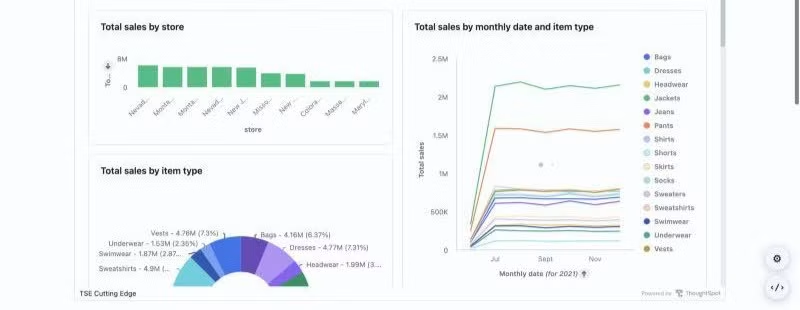
The bottom of the dashboard is cut off, with two scrollbars again, after you turn on fullHeight. A parent element has a fixed height and overflow: auto, so it clips the iframe.
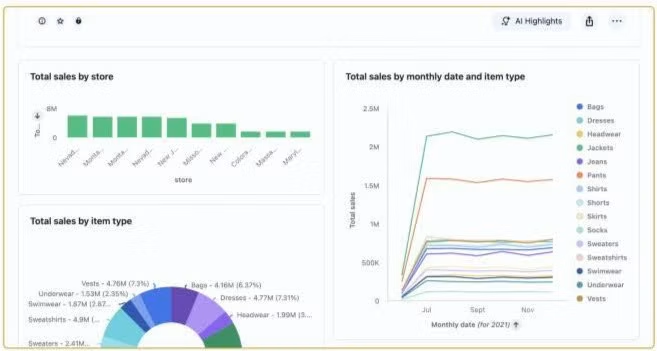
See both in the live demo: four pages embed the same Liveboard, and the ‹/› button on each page shows its SDK code.
Why does it happen?
fullHeight is off by default (lazy loading and full height). With it off, the embed keeps the height you give it and scrolls inside the iframe. With it on, "the embedded object container dynamically resizes according to the height of the Liveboard" (LiveboardViewConfig).
For teams building embeddable dashboards, understanding how iframe dimensions interact with the parent page's CSS and overflow settings is important for preventing layout and scrolling issues
How do I fix it?
1. Turn on fullHeight. It works on LiveboardEmbed and AppEmbed.
import { LiveboardEmbed } from '@thoughtspot/visual-embed-sdk';

const embed = new LiveboardEmbed('#embed', {
  liveboardId: '<LIVEBOARD_GUID>',
  fullHeight: true,   // the iframe grows with the Liveboard
  minimumHeight: 600, // SDK 1.44.2+ / ThoughtSpot 10.15.0.cl+; default 500; applies only with fullHeight
});
embed.render();
What to know:
From SDK 1.52.0, fullHeight: true also turns on lazy loading by default (SDK 1.52 changelog). On SDK 1.40 to 1.51 (ThoughtSpot 10.12.0.cl+), set lazyLoadingForFullHeight: true yourself.
lazyLoadingMargin sets how early a chart starts loading. From SDK 1.52.0 it defaults to '500px 0px', about one chart ahead of the scroll position. Use a smaller margin to cut warehouse queries further, or '0px' to load a chart only once it's visible (LiveboardViewConfig).
Let your page do the scrolling: don't put the embed container inside a fixed height with overflow: auto.
2. Need a fixed-size panel instead? Keep fullHeight off and give the frame a fixed height, so the panel scrolls on purpose.
new LiveboardEmbed('#embed', {
  liveboardId: '<LIVEBOARD_GUID>',
  frameParams: { width: '100%', height: '800px' },
}).render();
How do I check it worked?
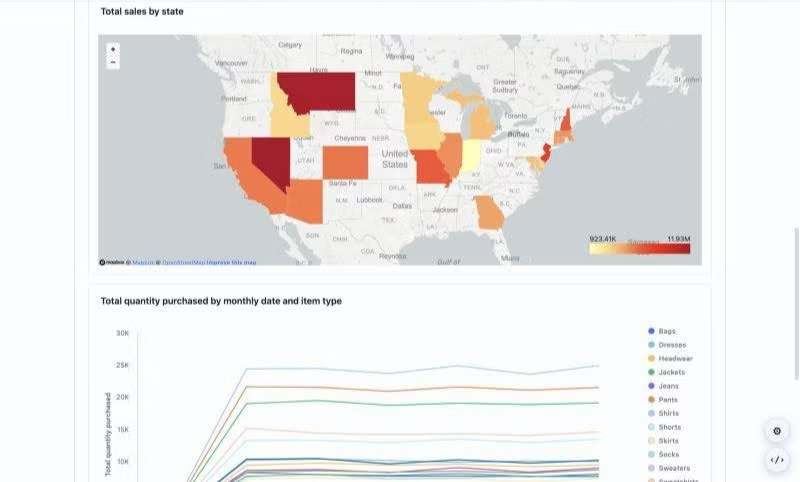
The page shows one scrollbar, its own. The iframe is as tall as the Liveboard, and its src includes isFullHeightPinboard=true. On SDK 1.52+, it also includes isLazyLoadingForEmbedEnabled=true, and charts below the fold show placeholders until you scroll near them.
Still failing?
Empty space in edit mode. A known fullHeight limitation that "does not affect the underlying data or functionality" (known issues).
Slow first load on a large dashboard. On SDK below 1.52 without lazy loading, upgrade or set lazyLoadingForFullHeight: true.
The embed sits inside a modal or a scrolling panel. From SDK 1.52.0, enableScrollableContainerLazyLoading tracks scrollable parents, so charts still load as you scroll inside them. Set it to false only "when the page scrolls with the window and the embed has no clipping ancestor" (LiveboardViewConfig).
How do I explain this to my team?
|
Who |
What they'll ask |
What you can tell them |
|
Product lead |
Will it look like part of our product? |
Yes. It sizes to the page like the rest of our content, and our fonts and colors apply through CSS variables. |
|
Data lead |
Will long dashboards load the warehouse? |
No. Charts below the fold load only as users scroll near them: by default with fullHeight off, and with fullHeight on from SDK 1.52. |
How can I try this before I commit?
Start a free ThoughtSpot Embedded trial.


