


An AI analyst picks columns from your data model and the business rules it has learned. When two columns fit one word, like sales and quantity purchased for "top selling", it guesses. In ThoughtSpot, teach Spotter, ThoughtSpot's AI analyst, the rule once. On Spotter 3 it's saved as data model memory for every user, and the memory APIs (Beta, 26.8.0.cl and later) move it from dev to prod as YAML. On Spotter 2, add a data model instruction.
Checked against REST API SDK 2.29.1 and the ThoughtSpot Cloud 26.10.0.cl documentation, October 2026.
Spotter memory is how ThoughtSpot teaches its AI analyst your business rules, such as "top selling means quantity purchased". When one word fits two columns, the rule tells Spotter which to use. Memory is saved on the data model, applies to every user on Spotter 3, and exports as YAML for production.
This is closely related to the role of a semantic layer, which helps AI analysts understand business terminology, map questions to the right data fields, and deliver more consistent answers across an organization's data.
What should you check when you compare tools?
Stakeholders will ask whether the AI's answers are right, so look for control you can review. Spotter memory is "the context Spotter builds about your data and your business" (Spotter memory). You can export a Model's memory as YAML, review it in Git, and import it after a dry run (memory migration API).
Ask any vendor:
When the AI picks the wrong field, can I correct it in plain language, and does the fix apply to every user?
Can I export what the AI has learned, review it like code, and promote it from dev to prod?
Does the AI query a governed model, or raw tables?
When comparing semantic layer tools, consider whether they allow teams to define business terminology, manage data relationships, and maintain consistent metric definitions that AI analysts can use.
What does it look like?
The (Sample) Retail - Apparel Model has two measures that fit "selling": quantity purchased (units) and sales (revenue). Asked "What are the top selling products?", Spotter ranks products by sales:
An AI analyst picks columns from your data model and the business rules it has learned. When two columns fit one word, like sales and quantity purchased for "top selling", it guesses. In ThoughtSpot, teach Spotter, ThoughtSpot's AI analyst, the rule once. On Spotter 3 it's saved as data model memory for every user, and the memory APIs (Beta, 26.8.0.cl and later) move it from dev to prod as YAML. On Spotter 2, add a data model instruction.
Checked against REST API SDK 2.29.1 and the ThoughtSpot Cloud 26.10.0.cl documentation, October 2026.
Spotter memory is how ThoughtSpot teaches its AI analyst your business rules, such as "top selling means quantity purchased". When one word fits two columns, the rule tells Spotter which to use. Memory is saved on the data model, applies to every user on Spotter 3, and exports as YAML for production.
This is closely related to the role of a semantic layer, which helps AI analysts understand business terminology, map questions to the right data fields, and deliver more consistent answers across an organization's data.
What should you check when you compare tools?
Stakeholders will ask whether the AI's answers are right, so look for control you can review. Spotter memory is "the context Spotter builds about your data and your business" (Spotter memory). You can export a Model's memory as YAML, review it in Git, and import it after a dry run (memory migration API).
Ask any vendor:
When the AI picks the wrong field, can I correct it in plain language, and does the fix apply to every user?
Can I export what the AI has learned, review it like code, and promote it from dev to prod?
Does the AI query a governed model, or raw tables?
When comparing semantic layer tools, consider whether they allow teams to define business terminology, manage data relationships, and maintain consistent metric definitions that AI analysts can use.
What does it look like?
The (Sample) Retail - Apparel Model has two measures that fit "selling": quantity purchased (units) and sales (revenue). Asked "What are the top selling products?", Spotter ranks products by sales:
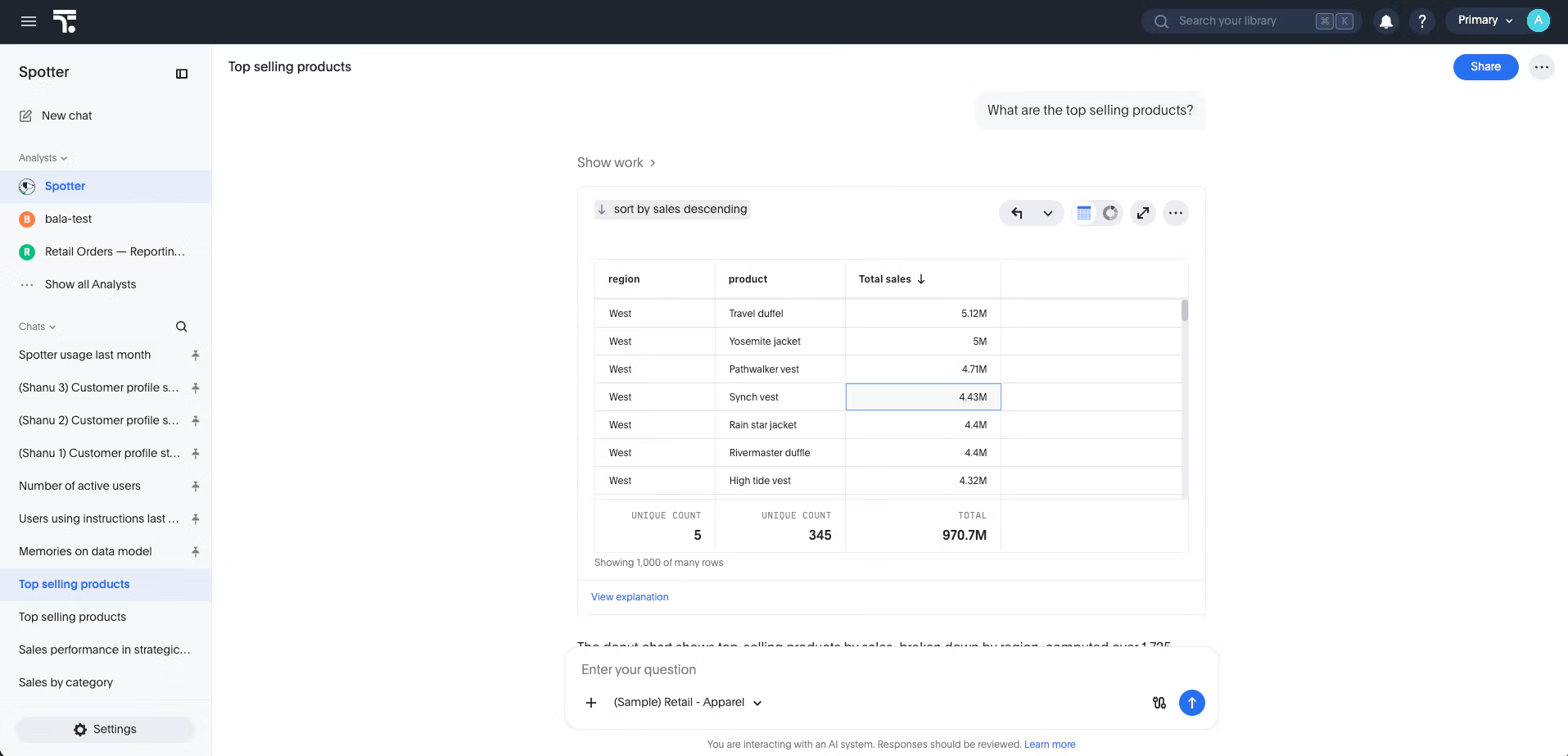
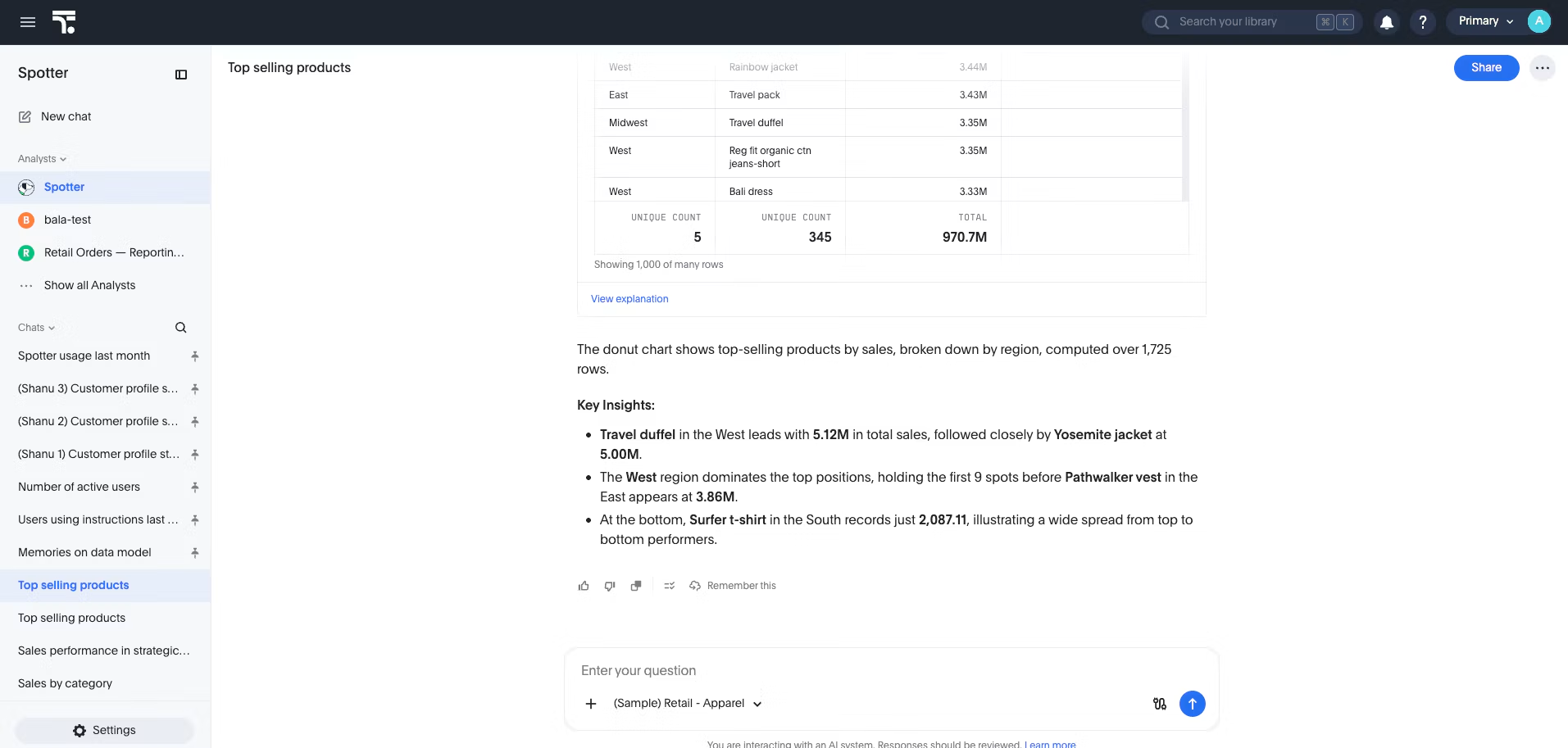
For this team, a $500 jacket sold once shouldn't outrank a $10 shirt sold a thousand times. With the rule in place, the same question ranks products by quantity purchased:
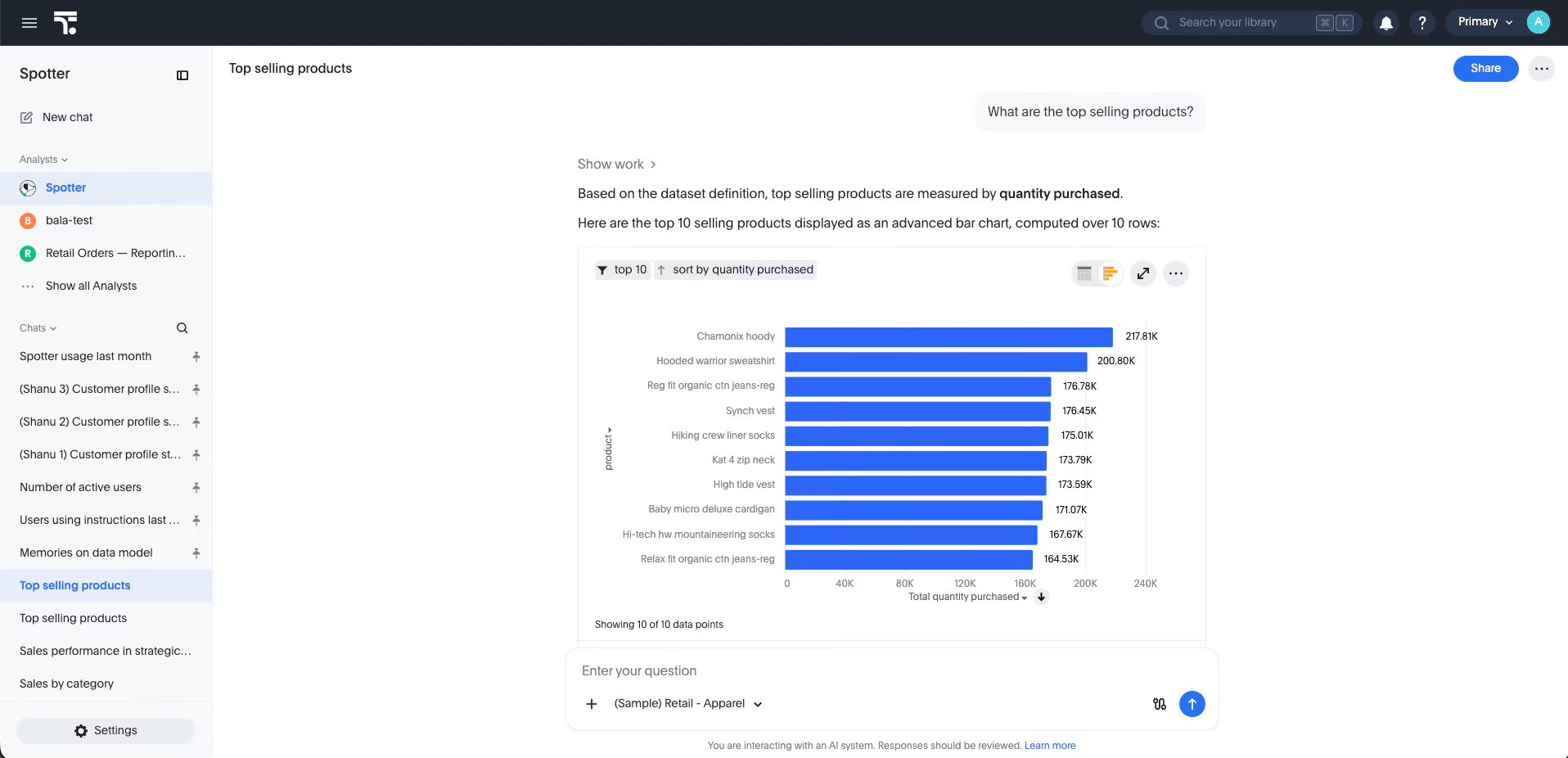
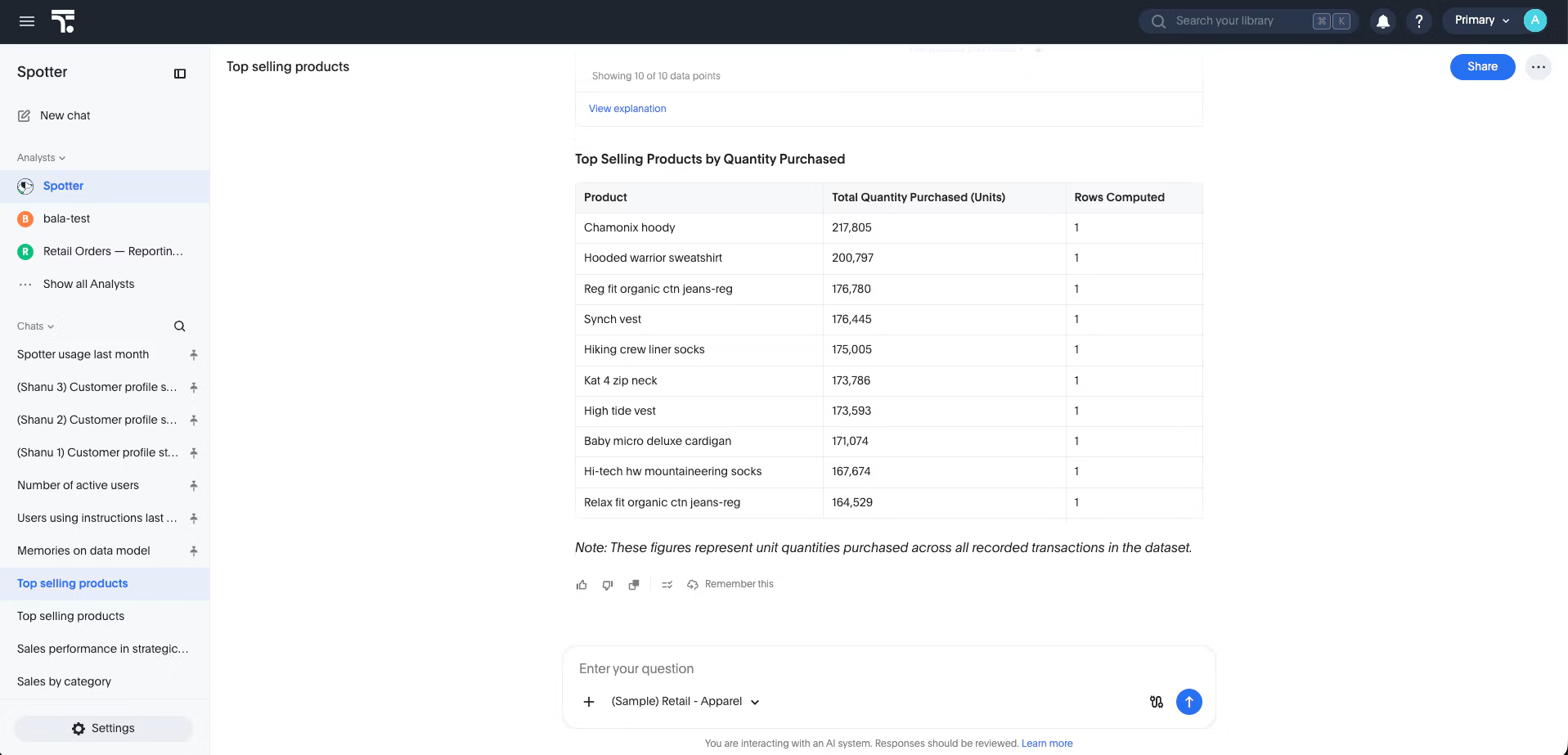
Why does it happen?
Without guidance, "selling" matches sales by name. Names, synonyms and descriptions tell Spotter what each column is, not which one your business means. That's a business rule. ThoughtSpot's Model guidance: "If identical strings appear in multiple columns, it may confuse Spotter's judgement on column selection" (optimize your data model).
How do I fix it?
1. Clean up the Model first. Use clear names, distinct synonyms and short descriptions, review AI Context, and index only the columns you need (optimize your data model).
2. Teach Spotter the rule (Spotter 3). In a conversation, correct the answer and say "Remember this: top selling means quantity purchased, not sales." If you have Manage Memory permission, Model edit access or admin access, Spotter saves it as shared memory for every user of the Model (learn from conversations). Or generate memory from up to three trusted Liveboards (learn from Liveboards).
3. On Spotter 2, add a data model instruction instead:
curl -X POST 'https://<TS_HOST>/api/rest/2.0/ai/instructions/set' \
  -H 'Authorization: Bearer <TOKEN>' \
  -H 'Accept: application/json' \
  -H 'Content-Type: application/json' \
  --data-raw '{
    "data_source_identifier": "<MODEL_GUID>",
    "nl_instructions_info": [
      {
        "instructions": ["Top selling means quantity purchased, not sales."],
        "scope": "GLOBAL"
      }
    ]
  }
It replaces the Model's instructions, so read them first with POST /api/rest/2.0/ai/instructions/get and send the full list (data model instructions API). Instructions take up to 10,000 characters from 26.5.0.cl.
4. Promote the memory from dev to prod. Export it with a token for the source Org:
curl -X POST 'https://<SOURCE_HOST>/api/rest/2.0/ai/memory/export' \
  -H 'Authorization: Bearer <SOURCE_TOKEN>' \
  -H 'Accept: application/json' \
  -H 'Content-Type: application/json' \
  --data-raw '{
    "sources": [
      { "type": "DATA_MODEL", "identifiers": ["<MODEL_GUID>"] }
    ]
  }'
The content field holds the memory as YAML:
memories:
- type: RULE
  content:
    rule_definition: "Top selling means quantity purchased, not sales."
  datamodel_sources:
  - guid: <MODEL_GUID>
    obj_id: <MODEL_OBJ_ID>
  tags: []
Review it in Git. Items resolve by obj_id first, so if the target Model's obj_id differs, update datamodel_sources or the item fails with UNRESOLVED_SOURCE. Dry run the import with a target Org token, passing the YAML as a JSON string:
curl -X POST 'https://<TARGET_HOST>/api/rest/2.0/ai/memory/import' \
  -H 'Authorization: Bearer <TARGET_TOKEN>' \
  -H 'Accept: application/json' \
  -H 'Content-Type: application/json' \
  --data-raw '{
    "content": "<YAML_FROM_EXPORT>",
    "dry_run": true
  }
Then send "dry_run": false. Import replaces the Model's memory, so check deleted_record_count first. Check status, not the HTTP code: VALIDATION_FAILED returns 200 and writes nothing.
How do I check it worked?
Ask the original question in a new conversation, in prod after an import. It should rank by quantity purchased. To test variants, ask Spotter "Based on what you just learned, what questions can I ask to test whether you're applying this correctly?" If the same fix keeps coming back, "the issue is structural": change the Model (diagnose Spotter answers).
Still failing?
The user names a column directly. What a user asks for beats saved rules: "top selling products by sales" gets sales.
The rule only applies to you. The Remember this button saves to personal memory. Type the correction in the conversation instead.
401, 403 or ACCESS_DENIED. Check the token's Org and the privileges (Blog 5).
Spotter 2 or Classic. "Memory is only generated and applied when Spotter 3 is enabled for your Org." Spotter 2 uses instructions; Classic supports neither.
How do I explain this to my team?
|
Who |
What they'll ask |
What you can tell them |
|
Product lead |
Can we trust the answers? |
We correct a wrong answer once, and every user on that Model gets the fix. |
|
Platform team |
How do we manage changes across environments? |
We teach Spotter in dev, review the exported YAML in Git, and import it into prod after a dry run. |
How can I try this before I commit?
Start a free ThoughtSpot Embedded trial.


