

Seven AgentSpot agents now augment every step of our content development pipeline, shifting our team’s focus from manual operational tasks to high-value content development and strategy.
Our eLearning development team at ThoughtSpot manages around 50 courses and hundreds of videos across six learning paths on ThoughtSpot University. We build enablement content for external customers: business users, business analysts, data experts, and administrators. For years, the work behind every new video was invisible: hours spent reading release notes to figure out what changed, tracking down the right PM across Confluence, Slack, and email, and writing scripts manually from documentation and SME meetings.
So we built our way out of it. Using AgentSpot, ThoughtSpot's custom AI agent builder, we mapped every friction point in our content development lifecycle and replaced each one with a purpose-built agent.
Why did we need agents in the first place?
Content development for a rapidly shipping product is genuinely demanding. Every release brings new features, renamed UI elements, deprecated workflows, and changed terminology; any of those can make a lesson inaccurate overnight. Before agents, one person on our team would spend hours manually reading release notes and guessing which of our courses were affected. Another stretch of time would go toward finding the PM who owned the relevant feature area. Then, scripting would begin from scratch.
These were not edge cases; they were recurring, predictable, and draining enough to justify a systematic fix.
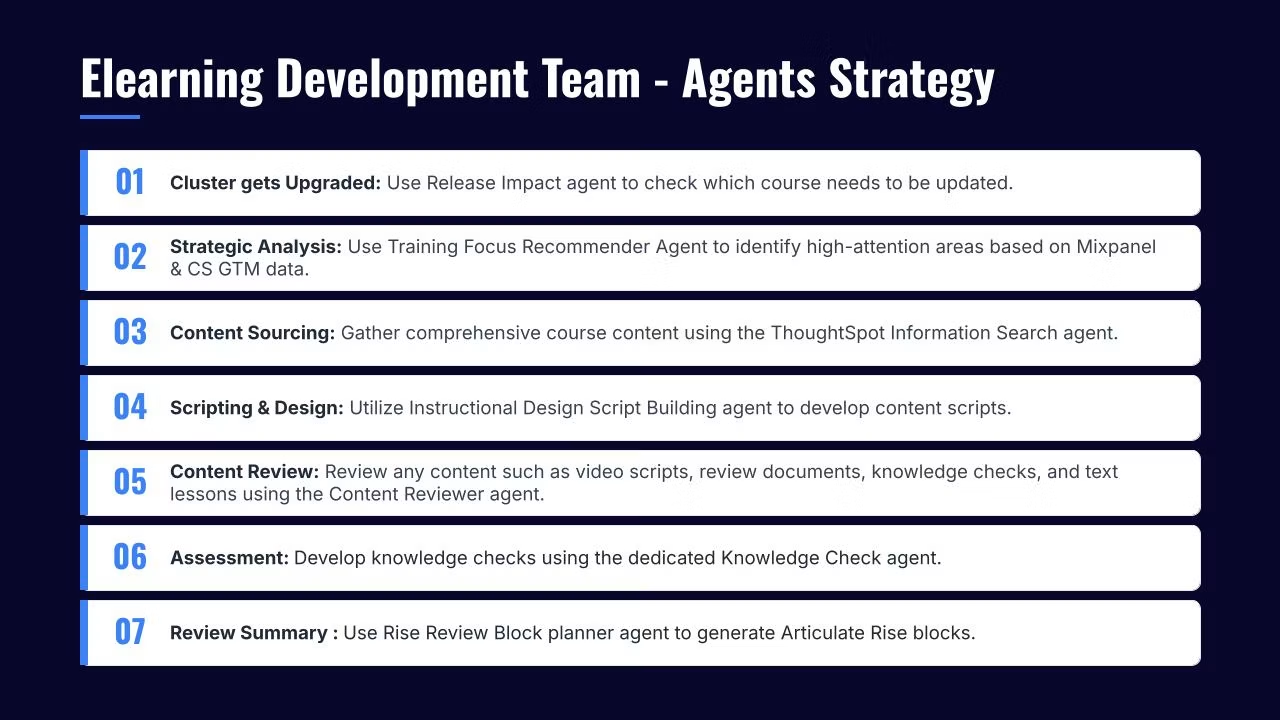
How did we design the seven-agent workflow?
We traced the content lifecycle from the moment ThoughtSpot ships a release to the moment a learner completes a knowledge check. Seven distinct stages emerged, and each became an agent configured on AgentSpot.
Agent 01: Release Impact Agent
The first question after any release is which of our courses needs updating. The Release Impact Agent fetches the live release notes directly from ThoughtSpot documentation, reads all six learning path files we uploaded as structured knowledge JSON files, and scores each path on a four-point scale (None, Low, Medium, or High) based on how much the release touches its content. It produces a Plotly bar chart showing the impact distribution across all six paths, then drills down to the exact course and lesson with a suggested update.
What used to take a manual read-through now returns a structured report in minutes.
Agent 02: Training Focus Recommender Agent
Knowing what changed in the product is only half the picture. We also need to make sure we're investing effort in the right features. This agent pulls data from Mixpanel product usage and Customer Success / Go-To-Market (CS/GTM) customer pain data, then maps both signals against our training catalog.
For example, when a feature shows both high customer pain (a spike in P1, or priority-one, support cases) and high usage, we prioritize enabling it, reducing customer confusion where it matters most.
Agent 03: ThoughtSpot Information Search Agent
Before scripting, writers need context: who owns this feature, what did the PM say in the last product review, is there a deck that the product team shared in one of the Slack channels, or are there any best practices in Confluence. This agent connects across Google Drive, Slack, Confluence, and GTM Buddy (our sales enablement tool) and returns cited results with direct links.
Gathering source material used to take hours of back-and-forth with PMs, some of whom are in different time zones, which added even more delay. Now it's just a matter of a single query, and all the source materials shared can be obtained in minutes.
Agent 04: Instructional Design Script Building Agent
This is where the time savings compound most visibly. This agent takes a documentation URL, a learner persona (Business User, Business Analyst, or Administrator), and any supplementary materials (PM meeting notes, call transcripts, anything the information search agent surfaced) and produces a fully structured, voiceover-ready training script.
The output follows a strict format: lesson title, learning objectives written with Bloom's Taxonomy verbs, theory slides with narration copy, and a demo walkthrough. Instructional design principles like progressive disclosure and cognitive load reduction are applied automatically, not left to the writer to remember. Script development time dropped by 60-–70% after deploying this agent.
Agent 05: Instructional Design Script Reviewer Agent
Once we build the script, we run it through the instructional design content reviewer agent which reads our learning content (storyboards, scripts, course outlines, facilitator guides, job aids, and Rise/Articulate exports) and returns a structured critique covering learner experience, cognitive load, engagement, multimedia principles, and structure, with every finding tied to an exact location and a concrete fix.
On top of the instructional design analysis, the agent does a full editorial pass on grammar, mechanics, word choice, tone, and terminology consistency. This means we get both the learning science rigor and the writing quality feedback in one review.
Agent 06: Skilljar Knowledge Check Writer and Reviewer
Every lesson needs a knowledge check. This agent reads the lesson script, identifies one to three actionable learning takeaways, and writes exactly one quiz question per takeaway in Skilljar's format: multiple choice, multiple select, or true/false. This agent ensures that each learning objective is assessed accordingly in a one-to-one approach.
Learners are never asked questions about details that weren’t covered in the instructional content. And, this helps our team appropriately identify a course’s strengths and opportunities for improvement. If learners are all struggling with a particular knowledge check question, then the instructional content needs to be revised to reinforce the material.
The agent also runs in reviewer mode: we can paste in existing questions, and it audits each one against writing and pedagogical standards, returning a Pass, Pass with edits, or Fail verdict with specific issues and suggested fixes.
Agent 07: Rise Review Block Planner
Every one of ThoughtSpot University’s courses comes with a review block made in Articulate Rise, which summarizes the course. This agent converts lesson content into Articulate Rise 360 interactive blocks. The agent reads the script, extracts learning objectives written in second-person active voice, recommends one Rise block type per objective (accordion, flashcard, sorting activity, quiz), and writes complete copy for each block, ready to paste directly into Rise.
For blocks requiring screenshots, it generates a precise capture spec: the UI location, pre-capture setup steps, frame guidance, caption text, and alt text. This agent reduces the amount of time and energy our team spends reformatting our content for different delivery methods. We no longer have to consider how to package segments of instructional video into review activities designed for learner interaction. And, we can keep the review lessons current with each release, so learners stay up to speed on our newest features.
What did this change for the team?
The workflow is now AI-augmented at every stage, with each agent owning the repeatable, information-heavy part of its step so Instructional Designers can focus on judgment calls: choosing the right angle for a lesson, deciding what to cut, and catching anything the agent missed. That is where the team's expertise actually belongs.
That scripting time reduction is the number that stands out, but the compounding effect matters more. Across 50 courses and hundreds of videos, getting that time back at every development cycle is substantial. Beyond speed, quality has improved because every agent is grounded in the actual documentation, the actual product usage data, and the actual lesson catalog, not memory or approximation.
Building the agents was also faster than expected. AgentSpot makes configuration accessible without engineering support. If you understand your team's pain points clearly (and after living with them for years, you do), translating them into an agent is within reach. The pain itself becomes the product brief.
Ready to build AI agents for your own workflows? Try AgentSpot today.
FAQs
1. Do you need engineering support to build agents like these on AgentSpot?
No. AgentSpot is built for business users and teams. The agents described here were configured by a learning content practitioner, not an engineer. The essential input is a precise understanding of the workflow step you want to automate.
2. How does the Release Impact Agent know which courses are affected by a new release?
Each of the six learning paths is uploaded as a structured knowledge JSON file inside the agent. At analysis time, the agent fetches the release notes live from docs.thoughtspot.com, maps release signals (new features, deprecations, UI changes, renamed terminology) against the learning path content, and scores each path for impact severity from None to High.
3. Can the Instructional Design Script Building Agent write for different learner types?
Yes. It supports three defined personas: Business User, Business Analyst/Data Analyst, and Administrator/Data Modeler. Each persona changes the depth, terminology, and focus of the output; the same feature documentation produces three distinct scripts depending on who the lesson is for.
4. What happens when a knowledge check question fails the reviewer audit?
The Skilljar Knowledge Check Reviewer returns a specific diagnosis and a suggested fix for every failed question. It does not rewrite the question automatically; it gives the author the precise issue so the correction is deliberate and tied back to the source material.
5. How does the Rise Review Block Planner decide which block type to recommend?
It maps each learning objective to a Rise 360 block type using principles of learning: a comparison concept maps to a sorting activity, a procedural step maps to a process block. It only recommends block types that exist natively in Rise 360 and flags anything it cannot map cleanly rather than approximating it.
6. How long did it take to build all seven agents?
We configured the first agent in a day; the full seven-agent pipeline was running within three weeks.


